Build guides
Publish a vehicle report for every car on the lot
Last updated:
Build Larkspur Motors' lot app on Next.js and better-auth: add cars by VIN or a pasted list, publish a report per car with its specs, market placement, window sticker and model-year recalls, and print a windshield QR card. See the use case.
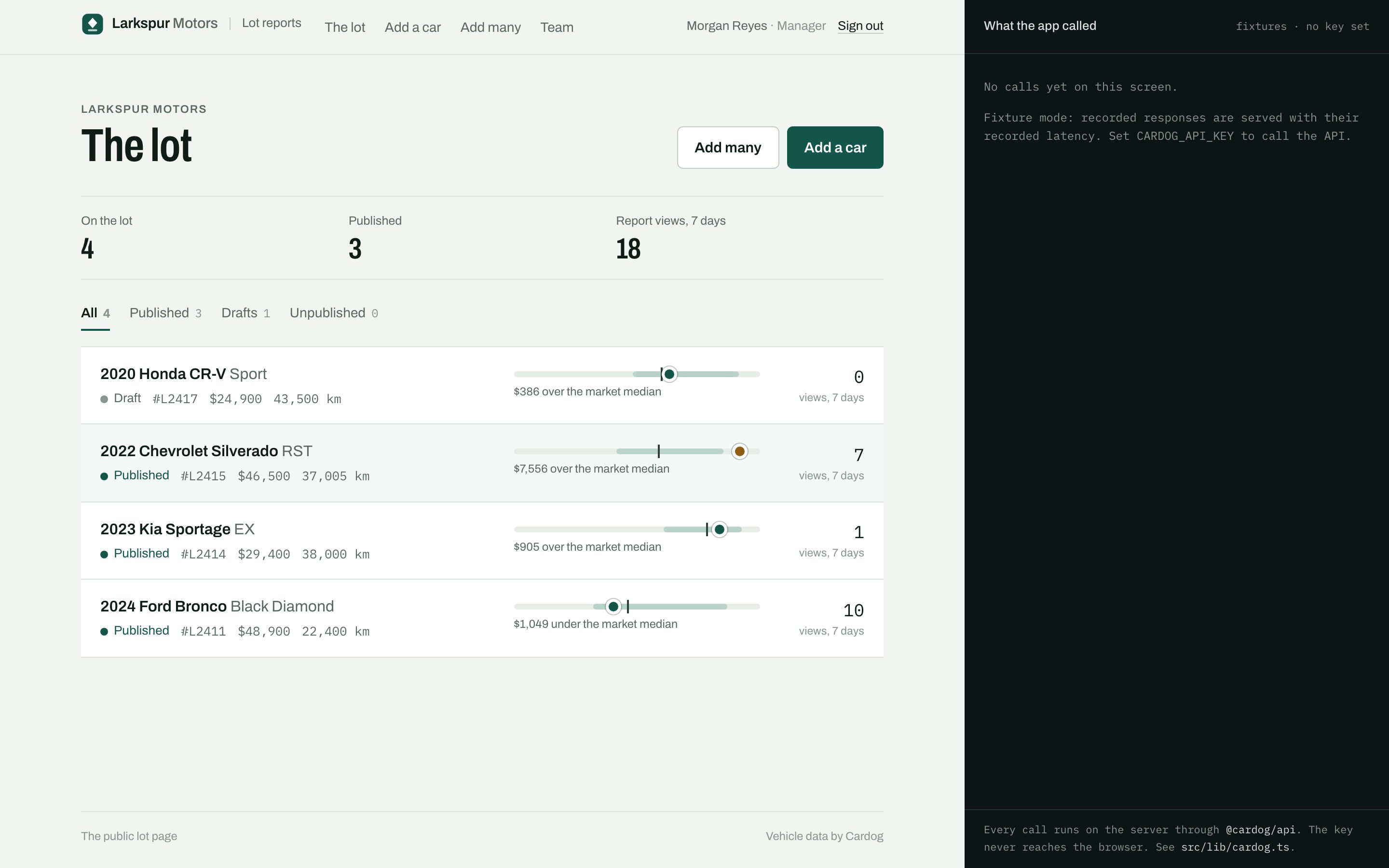
You'll build Larkspur Motors, a car dealership's app: add a car by VIN and buyers scan its report from the windshield. See what it does.
- Time: About an hour, or 5 minutes to clone and run.
- You need: Node 20 or later and pnpm, A Cardog API key, Some Next.js
- Cardog SDK:
cardog.v2.vin.getByVin,cardog.v2.vin.batch,cardog.v2.specs.sheetByBuild,cardog.v2.vin.windowSticker,cardog.v2.vin.windowStickerDocument,cardog.v2.quotes.getByRef,cardog.v2.quotes.getMany,cardog.v2.recalls.entity - Clone the finished app: cardog-ai/example-lot-vehicle-reports, or build it step by step below.
git clone https://github.com/cardog-ai/example-lot-vehicle-reports.git1. Get an API key
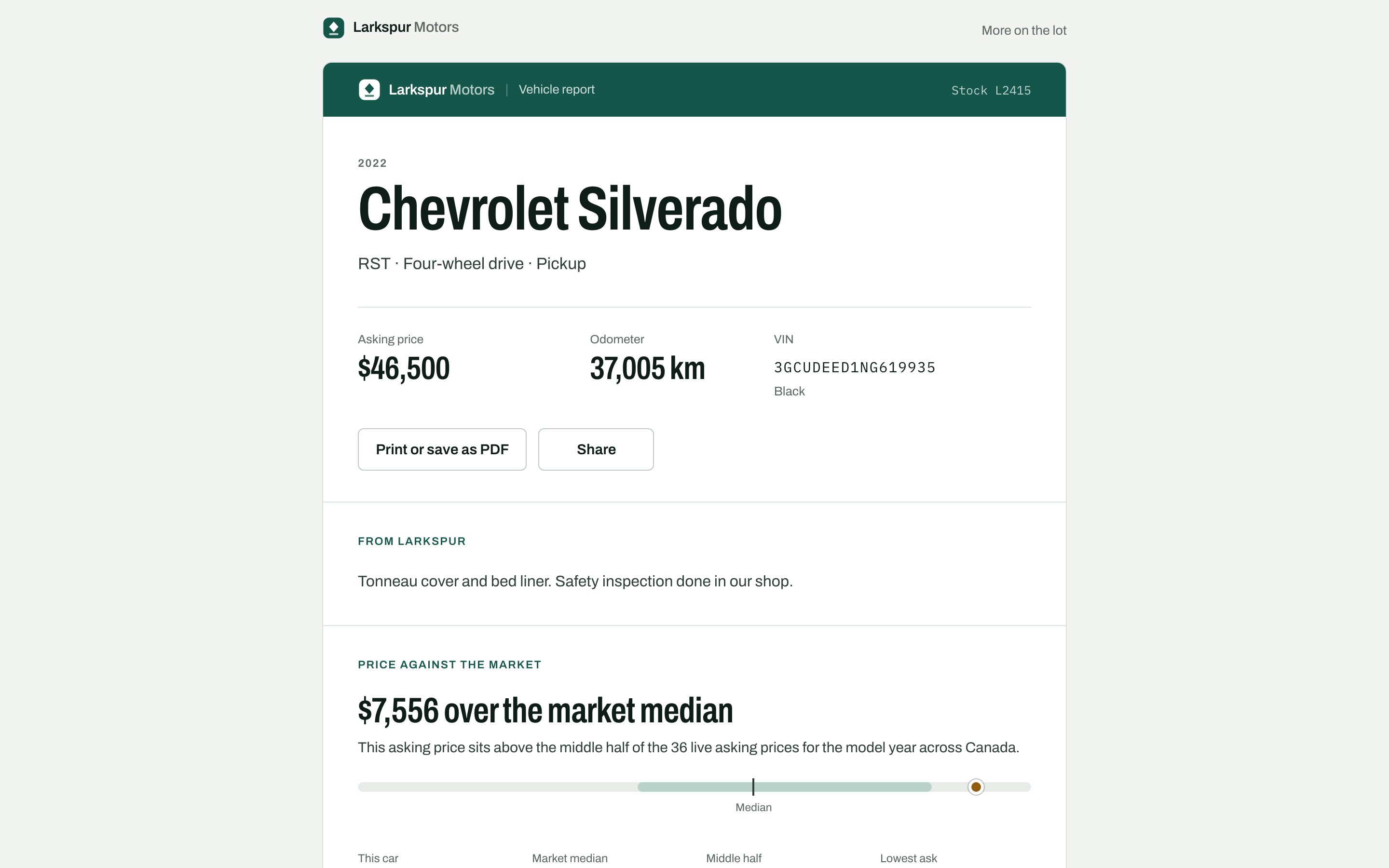
Every request to Cardog carries a key. Create one under Account → API, then copy .env.example to .env.local. The app reads the key on the server; the browser never sees it.
The example values run as shipped. Without a key the app runs on responses recorded for five VINs, so you can follow along before you sign up. PUBLIC_URL is the address the windshield codes carry.
BETTER_AUTH_SECRET ships as a development placeholder, so a fresh clone builds and runs. Replace it with your own (openssl rand -base64 32) before you deploy: a production server will not start without one, and warns on every start while the placeholder is set.
.env.example
# Copy to .env.local. With these values the app runs on recorded fixtures
# and a development auth secret.

# Your Cardog API key (https://cardog.app/account/api). Server-side only; it
# never reaches the browser. Leave empty for fixture mode.
CARDOG_API_KEY=

# Signs sessions. This value is a DEVELOPMENT PLACEHOLDER so a fresh clone
# builds and runs; the app warns on every production start while it is set.
# Replace it before deploying: openssl rand -base64 32
BETTER_AUTH_SECRET=larkspur-dev-only-secret-replace-before-deploying

# Where the app is served. Needed when it is not http://localhost:3028.
BETTER_AUTH_URL=http://localhost:3028

# The address buyers reach, printed into each windshield QR code. Defaults to
# the host the staff page was opened on, which is wrong behind some proxies.
PUBLIC_URL=

# SQLite file. Created on first run.
DATABASE_PATH=data/larkspur.db

# Seeded review logins (created by `pnpm db:setup` on an empty database):
#   manager  manager@larkspur.example / larkspur-manager
#   staff    staff@larkspur.example   / larkspur-staff
#   pending  casey@larkspur.example   / larkspur-pending
2. Create the Next.js app
Larkspur's lot is one Next.js app: the staff screens, the public reports and the server code that talks to Cardog. SQLite keeps it to one process with nothing else to run. better-sqlite3 is a native module, so the config loads it at runtime; qrcode draws the windshield codes.
terminal
pnpm create next-app@latest larkspur-lot --ts --app --tailwind --src-dir
cd larkspur-lot
pnpm add @cardog/api better-auth better-sqlite3 drizzle-orm qrcode server-only
pnpm add -D drizzle-kit tsx @types/better-sqlite3 @types/qrcode
next.config.ts
import type { NextConfig } from "next";

const nextConfig: NextConfig = {
  // better-sqlite3 is a native module: load it from node_modules at runtime.
  serverExternalPackages: ["better-sqlite3"],
  // This app is its own root, even when it sits inside another repository.
  outputFileTracingRoot: process.cwd(),
};

export default nextConfig;
3. Add staff accounts
Staff sign in with email and password. Anyone can ask for access, but role is a user field sign-up cannot set, so a new account waits as pending until a manager lets it in from the Team page. Every staff page and action checks the role itself.
authSecret() picks the secret that signs sessions: yours whenever BETTER_AUTH_SECRET is set, and the development placeholder only on your machine and during next build. A production server with no secret stops, and one still on the placeholder logs a warning.
src/lib/auth.ts
function authSecret(): string {
  const set = process.env.BETTER_AUTH_SECRET?.trim();
  const production = process.env.NODE_ENV === "production" && process.env.NEXT_PHASE !== "phase-production-build";
  if (set) {
    if (production && set === DEV_SECRET) {
      console.warn("[larkspur] BETTER_AUTH_SECRET is the development placeholder. Replace it before deploying.");
    }
    return set;
  }
  if (!production) return DEV_SECRET;
  throw new Error("[larkspur] BETTER_AUTH_SECRET is not set. Generate one with `openssl rand -base64 32`.");
}
src/lib/auth.ts
export const auth = betterAuth({
  appName: "Larkspur Motors",
  baseURL: process.env.BETTER_AUTH_URL || "http://localhost:3028",
  secret: authSecret(),
  database: drizzleAdapter(db, {
    provider: "sqlite",
    schema: { user: schema.user, session: schema.session, account: schema.account, verification: schema.verification },
  }),
  emailAndPassword: { enabled: true, minPasswordLength: 8, autoSignIn: true },
  user: {
    additionalFields: {
      role: { type: "string", required: false, defaultValue: "pending", input: false },
    },
  },
  plugins: [nextCookies()],
});
src/app/api/auth/[...all]/route.ts
import { toNextJsHandler } from "better-auth/next-js";
import { auth } from "@/lib/auth";

export const { GET, POST } = toNextJsHandler(auth);
src/lib/session.ts
export async function requireStaff(): Promise<Viewer> {
  const v = await getViewer();
  if (!v) redirect("/sign-in");
  if (v.role === "pending") redirect("/waiting");
  return v;
}
4. Construct the Cardog client on the server
One file holds every Cardog call. The client is built once from the key, and the server-only import fails the build if a browser bundle ever reaches for it. Each call is timed and logged, which is what the app's "What the app called" pane shows.
SDK call: new CardogClient({ apiKey, appId })
src/lib/cardog.ts
const apiKey = process.env.CARDOG_API_KEY?.trim();

/** The one Cardog client. Server-side only. */
export const cardog: CardogClient | null = apiKey
  ? new CardogClient({ apiKey, appId: "larkspur-lot-reports", baseUrl: process.env.CARDOG_BASE_URL || undefined })
  : null;

export const dataMode: "live" | "fixture" = cardog ? "live" : "fixture";
export { FIXTURE_VINS };

// The v2 response types, read off the client's own method signatures.
type V2 = CardogClient["v2"];
export type VinIdentity = Awaited<ReturnType<V2["vin"]["getByVin"]>>;
export type VinBatch = Awaited<ReturnType<V2["vin"]["batch"]>>;
export type BuildSpecSheet = Awaited<ReturnType<V2["specs"]["sheetByBuild"]>>;
export type WindowSticker = Awaited<ReturnType<V2["vin"]["windowSticker"]>>;
export type MarketQuote = Awaited<ReturnType<V2["quotes"]["getByRef"]>>;
export type MultiQuote = Awaited<ReturnType<V2["quotes"]["getMany"]>>;
export type ModelYearRecalls = Awaited<ReturnType<V2["recalls"]["entity"]>>;

export interface Result<T> {
  data: T | null;
  call: CallRecord;
  error: string | null;
}
5. Decode the VIN
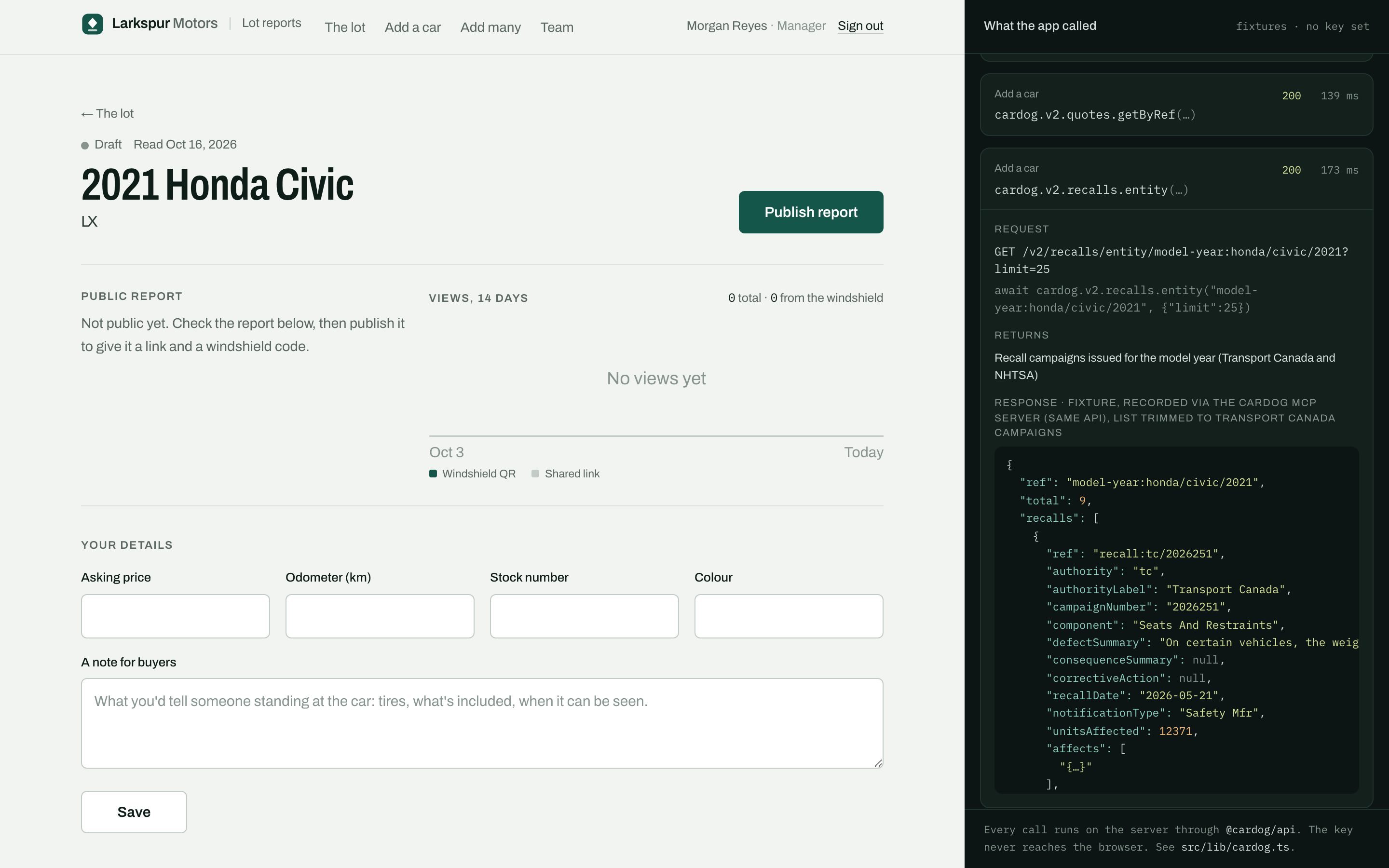
A report starts from the decode. It returns the vehicle in words, the build code (nano) the spec sheet takes, and the model-year ref the quote and the recalls take.
SDK call: cardog.v2.vin.getByVin(vin)
What comes back. Year, make, model and trim, refs such as refs.modelYear, refs.bodyStyle and refs.driveType, the build code nano, and the decoded attributes.
src/lib/cardog.ts
export function decodeVin(vin: string, step: string) {
  return run<VinIdentity>({
    step,
    method: "cardog.v2.vin.getByVin",
    args: [vin],
    http: `GET /v2/vin/${vin}`,
    returns: "Identity card: year, make, model, trim, refs, build code, decoded attributes",
    fixture: () => fixtureCall(vin, "decode"),
    live: (c) => c.v2.vin.getByVin(vin),
  });
}
6. Read everything the report needs
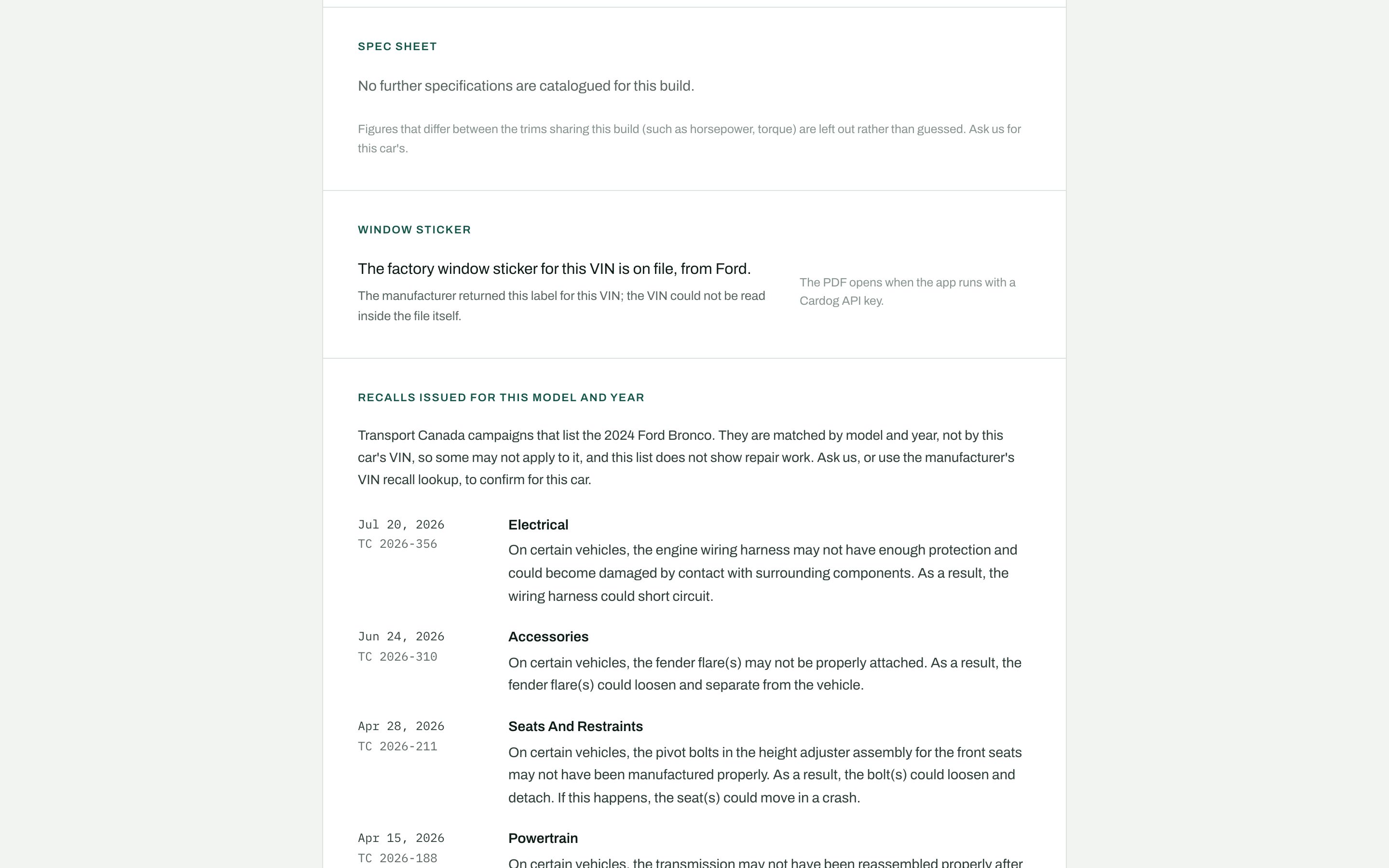
With the decode in hand, four reads run in parallel: the build's spec sheet, the window sticker, the market quote and the recalls. The spec sheet lists the ids that differ between trims sharing the build, and the report leaves them out rather than guess. The sticker answers with the label on file or the reason there is none; absence is normal.
Recalls are matched by model and year, not by VIN. The report titles the section "Recalls issued for this model and year" and lists Transport Canada campaigns.
SDK call: cardog.v2.specs.sheetByBuild(nano)
What comes back. Spec values by section, each with its unit and source, and trimDependent: the ids that vary between the trims sharing this build.
src/lib/cardog.ts
export function readBuildSpecs(nano: string, vin: string, step: string) {
  return run<BuildSpecSheet>({
    step,
    method: "cardog.v2.specs.sheetByBuild",
    args: [nano],
    http: `GET /v2/specs/${nano}`,
    returns: "The build's spec sheet by section, plus the ids that vary by trim",
    fixture: () => fixtureCall(vin, "specs"),
    live: (c) => c.v2.specs.sheetByBuild(nano),
  });
}
src/lib/cardog.ts
export function readWindowSticker(vin: string, step: string) {
  return run<WindowSticker>({
    step,
    method: "cardog.v2.vin.windowSticker",
    args: [vin],
    http: `GET /v2/vin/${vin}/window-sticker`,
    returns: "The window sticker we hold for the VIN, or the reason there is none",
    fixture: () => fixtureCall(vin, "sticker"),
    live: (c) => c.v2.vin.windowSticker(vin),
  });
}
src/lib/cardog.ts
export function readMarketQuote(modelYearRef: string, step: string) {
  return run<MarketQuote>({
    step,
    method: "cardog.v2.quotes.getByRef",
    args: [modelYearRef],
    http: `GET /v2/quotes/${modelYearRef}`,
    returns: "Asking-price range and live listing count for the model year",
    fixture: () => fixtureByRef(modelYearRef, "quote"),
    live: (c) => c.v2.quotes.getByRef(modelYearRef),
  });
}
src/lib/cardog.ts
export function readModelYearRecalls(modelYearRef: string, step: string) {
  return run<ModelYearRecalls>({
    step,
    method: "cardog.v2.recalls.entity",
    args: [modelYearRef, { limit: 25 }],
    http: `GET /v2/recalls/entity/${modelYearRef}?limit=25`,
    returns: "Recall campaigns issued for the model year (Transport Canada and NHTSA)",
    fixture: () => fixtureByRef(modelYearRef, "recalls"),
    live: (c) => c.v2.recalls.entity(modelYearRef, { limit: 25 }),
  });
}
src/lib/vehicle-read.ts
export async function readVehicle(vin: string, step: string): Promise<VehicleRead> {
  const decode = await decodeVin(vin, step);
  if (!decode.data || !decode.data.valid) {
    return {
      vin,
      facts: null,
      calls: [decode.call],
      error: decode.error ?? "This VIN does not decode to a vehicle. Check it against the car.",
    };
  }
  return readAround(vin, decode.data, null, step, [decode.call]);
}
src/lib/vehicle-read.ts
async function readAround(
  vin: string,
  identity: VinIdentity,
  have: { quote: MarketQuote | null } | null,
  step: string,
  calls: CallRecord[]
): Promise<VehicleRead> {
  const modelYear = identity.refs.modelYear;
  const [specs, sticker, quote, recalls] = await Promise.all([
    identity.nano ? readBuildSpecs(identity.nano, vin, step) : null,
    readWindowSticker(vin, step),
    have ? null : modelYear ? readMarketQuote(modelYear, step) : null,
    modelYear ? readModelYearRecalls(modelYear, step) : null,
  ]);
  for (const r of [specs, sticker, quote, recalls]) if (r) calls.push(r.call);
  const facts = buildReport(vin, {
    decode: identity,
    specs: specs?.data ?? null,
    sticker: sticker.data,
    quote: have ? have.quote : quote?.data ?? null,
    recalls: recalls?.data ?? null,
  });
  return { vin, facts, calls, error: null };
}
7. Turn the reads into a report snapshot
buildReport is pure: five responses in, one snapshot out, with identity lines in words, spec sections in Canadian units, the sticker fact, the market and the recall list. The snapshot is stored with the car, so a busy windshield costs nothing.
The asking price is placed against the model year's live asking prices on render, so editing the price makes no API call.
src/lib/report.ts
export function buildReport(vin: string, r: Responses, readAt = new Date()): ReportFacts {
  const d = r.decode;
  const attrs = (d?.attributes ?? {}) as Record<string, { value?: unknown; name?: string; toName?: string }>;
  const year = d?.year ?? null;
  const make = d?.make ?? null;
  const model = d?.model ?? null;
  const trim = d?.trim ?? null;

  const identity: SpecLine[] = [];
  const add = (id: string, label: string, value: string | null | undefined) => {
    if (value) identity.push({ id, label, value });
  };
  add("bodyStyle", "Body", refName(d?.refs?.bodyStyle));
  add("driveType", "Drive", refName(d?.refs?.driveType));
  add("fuelType", "Fuel", refName(d?.refs?.fuelType));
  add("transmission", "Transmission", refName(d?.refs?.transmission));
  add("engine", "Engine", engineLine(attrs));
  add("doors", "Doors", d?.doors ? String(d.doors) : null);
  add("gvwr", "Weight class", attrs.gvwr?.toName ?? refName(d?.refs?.gvwr));
  add("plant", "Built in", plantLine(attrs));

  return {
    vin,
    decoded: !!d?.valid,
    year,
    make,
    model,
    trim,
    headline: [year, make, model].filter(Boolean).join(" ") || vin,
    identity,
    specs: r.specs ? specSections(r.specs, new Set(identity.map((l) => l.id))) : [],
    trimDependent: r.specs?.trimDependent ?? [],
    refs: { modelYear: d?.refs?.modelYear ?? null, nano: d?.nano ?? null, squish: d?.squish ?? null },
    sticker: stickerFact(r.sticker),
    market: r.quote ? marketFact(r.quote) : null,
    recalls: r.recalls ? canadianRecalls(r.recalls) : null,
    recallsListed: r.recalls?.total ?? null,
    readAt: readAt.toISOString(),
  };
}
src/lib/report.ts
export function pricePosition(price: number | null, m: MarketFact | null): PricePosition {
  if (!price) return { kind: "none", reason: "No asking price set." };
  if (!m || m.median == null || m.p25 == null || m.p75 == null)
    return { kind: "none", reason: "No live market quote for this model year." };
  if (m.liveCount < 3) return { kind: "none", reason: "Too few live listings to place the price." };
  const lo = Math.min(m.low ?? m.p25, price) * 0.98;
  const hi = Math.max(m.p75, price) * 1.04;
  const pos = (v: number) => Math.round(((v - lo) / (hi - lo)) * 1000) / 10;
  const vsMedian = price - m.median;
  const band = price < m.p25 ? "below" : price > m.p75 ? "above" : "within";
  const near = Math.abs(vsMedian) / m.median <= 0.015;
  const headline = near
    ? "At the market median"
    : `${money(Math.abs(vsMedian))} ${vsMedian < 0 ? "under" : "over"} the market median`;
  return {
    kind: "placed",
    band,
    headline,
    at: { car: pos(price), p25: pos(m.p25), median: pos(m.median), p75: pos(m.p75) },
    scale: { lo, hi },
    vsMedian,
  };
}
8. Add a car and publish it
Add a car checks the VIN, reads it and saves the car as a draft with its snapshot and the log of calls behind it. Staff add the price, odometer, stock number and a note for buyers, check the report exactly as buyers will see it, and publish. Unpublishing keeps the car and its views; its link then says the report is not available.
src/app/actions.ts
export async function addVehicle(form: FormData): Promise<AddResult> {
  const me = await requireStaff();
  const vin = normalizeVin(String(form.get("vin") ?? ""));
  const check = checkVin(vin);
  if (check.state !== "ok" && check.state !== "check-mismatch") {
    return { ok: false, error: "Enter the car's 17-character VIN.", calls: [] };
  }
  const existing = getByVin(vin);
  if (existing) return { ok: false, error: "This car is already on the lot.", calls: [], existingId: existing.id };

  const read = await readVehicle(vin, "Add a car");
  if (!read.facts) return { ok: false, error: read.error ?? "That VIN did not read.", calls: read.calls };
  const row = insertVehicle(vin, read.facts, read.calls, dealerFields(form), me.id);
  revalidatePath("/lot");
  return { ok: true, id: row.id, calls: read.calls };
}
src/app/actions.ts
export async function publishVehicle(id: string, publish: boolean) {
  await requireStaff();
  const v = getVehicle(id);
  if (!v) return;
  setStatus(id, publish ? "published" : v.status === "draft" ? "draft" : "unpublished");
  revalidatePath(`/lot/${id}`);
  revalidatePath("/lot");
  revalidatePath("/");
}
9. Add many from a pasted list
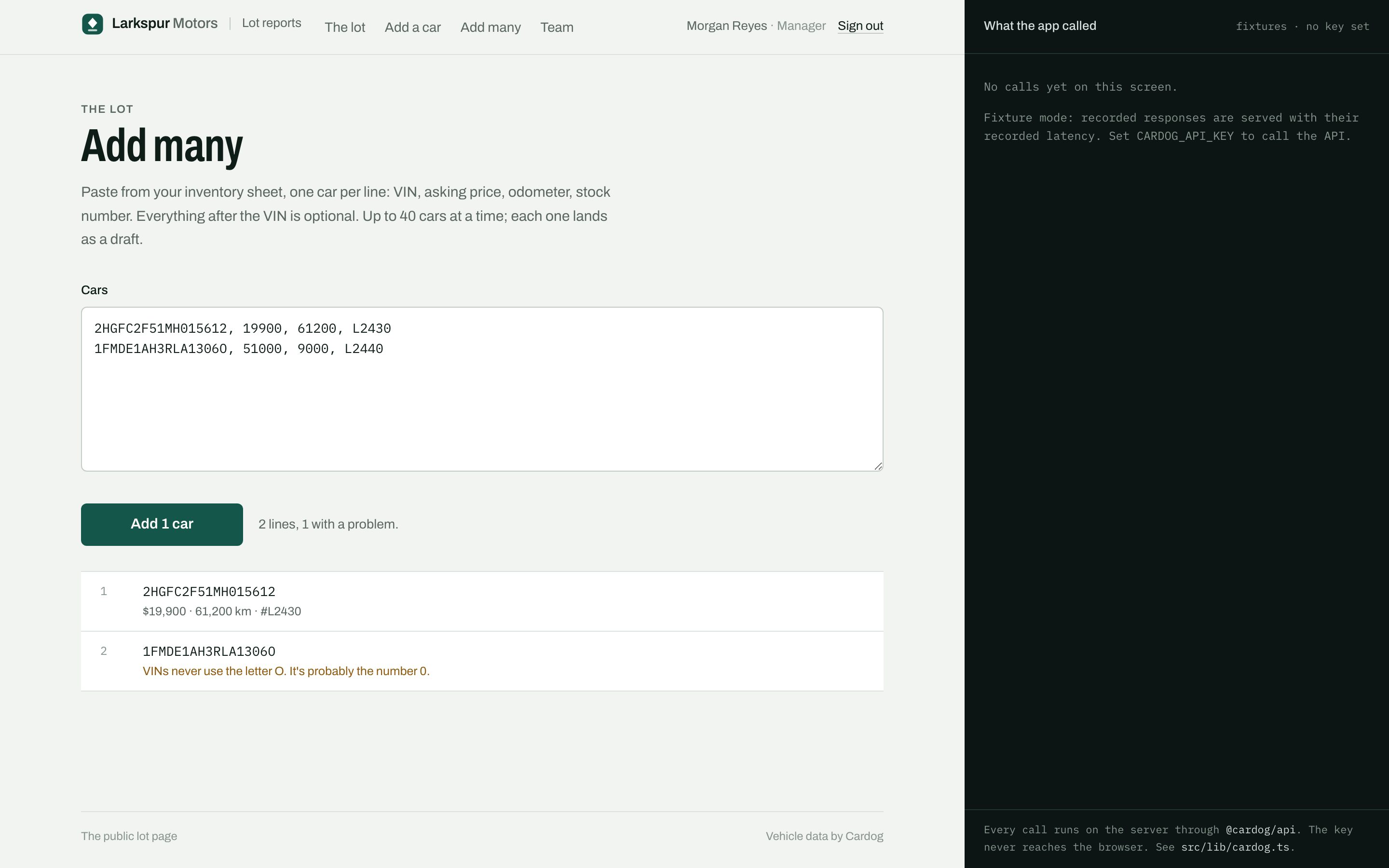
Staff paste from the inventory sheet: VIN, price, odometer and stock number, with commas or tabs. Each line is checked as it is typed. The paste is read with one batch decode and one multi-quote for every model year in it, then each car's spec sheet, sticker and recalls; every line gets its own outcome, so one mistyped VIN never fails the rest.
SDK call: cardog.v2.vin.batch(vins)
What comes back. One row for each VIN, in request order: { ok: true, identity } or { ok: false, error }.
src/lib/parse.ts
export function parsePaste(input: string): PastedLine[] {
  const seen = new Set<string>();
  const out: PastedLine[] = [];
  input.split(/\r?\n/).forEach((raw, i) => {
    if (!raw.trim()) return;
    // A tab means a spreadsheet paste. Otherwise commas and semicolons
    // separate, after thousands separators ("29,400") are taken out.
    const cells = raw.includes("\t")
      ? raw.split("\t")
      : raw
          .replace(/(\d),(\d{3})(?!\d)/g, "$1$2")
          .replace(/(\d),(\d{3})(?!\d)/g, "$1$2")
          .split(/[,;]/);
    const [v, price, odo, stock] = cells.map((c) => c.replace(/"/g, "").trim());
    const vin = normalizeVin(v ?? "");
    const check = checkVin(vin);
    let problem: string | null = null;
    if (check.state === "invalid") problem = check.message;
    else if (check.state === "typing") problem = `${17 - check.remaining} characters; a VIN has 17.`;
    else if (seen.has(vin)) problem = "Already on an earlier line.";
    seen.add(vin);
    out.push({
      line: i + 1,
      raw,
      vin,
      askingPrice: parseAmount(price),
      odometerKm:
        odo === undefined ? null : odo.replace(/[^\d]/g, "") === "" ? null : Number(odo.replace(/[^\d]/g, "")),
      stockNumber: text(stock, 24),
      problem,
    });
  });
  return out;
}
src/lib/cardog.ts
export function decodeVins(vins: string[], step: string) {
  return run<VinBatch>({
    step,
    method: "cardog.v2.vin.batch",
    args: [vins.length > 3 ? [...vins.slice(0, 3), `… ${vins.length - 3} more`] : vins],
    http: "POST /v2/vin/batch",
    returns: "One identity card or one error per VIN, in request order",
    fixture: () => fixtureBatch(vins),
    live: (c) => c.v2.vin.batch(vins),
  });
}
src/lib/cardog.ts
export function readMarketQuotes(refs: string[], step: string) {
  return run<MultiQuote>({
    step,
    method: "cardog.v2.quotes.getMany",
    args: [refs],
    http: `GET /v2/quotes?refs=${refs.join(",")}`,
    returns: "One quote per model year, in request order",
    fixture: () => fixtureQuotes(refs),
    live: (c) => c.v2.quotes.getMany(refs),
  });
}
src/lib/vehicle-read.ts
export async function readVehicles(
  vins: string[],
  step: string
): Promise<{ reads: VehicleRead[]; calls: CallRecord[] }> {
  const calls: CallRecord[] = [];
  const batch = await decodeVins(vins, step);
  calls.push(batch.call);
  if (!batch.data) {
    return { reads: vins.map((vin) => ({ vin, facts: null, calls: [], error: batch.error ?? "Batch failed" })), calls };
  }

  const identities = new Map<string, VinIdentity>();
  const errors = new Map<string, string>();
  for (const row of batch.data.results) {
    if (row.ok && row.identity.valid) identities.set(row.vin.toUpperCase(), row.identity);
    else errors.set(row.vin.toUpperCase(), row.ok ? "This VIN does not decode to a vehicle." : row.error.message);
  }

  // Quote every distinct model year in groups of 20, the multi-quote's limit.
  const refs = [...new Set([...identities.values()].map((i) => i.refs.modelYear).filter((r): r is string => !!r))];
  const quotes = new Map<string, MarketQuote>();
  for (let i = 0; i < refs.length; i += 20) {
    const group = refs.slice(i, i + 20);
    const res = await readMarketQuotes(group, step);
    calls.push(res.call);
    res.data?.quotes.forEach((q, k) => quotes.set(group[k], q));
  }

  const reads: VehicleRead[] = [];
  for (const vin of vins) {
    const identity = identities.get(vin);
    if (!identity) {
      reads.push({ vin, facts: null, calls: [], error: errors.get(vin) ?? "Not in the batch response." });
      continue;
    }
    const quote = identity.refs.modelYear ? quotes.get(identity.refs.modelYear) ?? null : null;
    const read = await readAround(vin, identity, { quote }, step, []);
    calls.push(...read.calls);
    reads.push(read);
  }
  return { reads, calls };
}
10. Serve the public report
/r/{id} renders the stored snapshot with no sign-in and no API call, with a print stylesheet and a share button. A beacon after load counts the view once per browser session, as a windshield scan or a shared link; signed-in staff are not counted.
The sticker PDF is the one fresh read. Its signed link lasts a day, so it is never stored: each open reads the label again and streams the PDF through the link.
SDK call: cardog.v2.vin.windowStickerDocument(downloadUrl)
What comes back. The fetch Response for the sticker PDF; the route streams its body.
src/app/r/[id]/client.tsx
export function ViewBeacon({ publicId, source }: { publicId: string; source: "qr" | "link" }) {
  useEffect(() => {
    const key = `larkspur:viewed:${publicId}`;
    try {
      if (sessionStorage.getItem(key)) return;
      sessionStorage.setItem(key, "1");
    } catch {
      /* storage blocked: count it anyway */
    }
    void fetch("/api/views", {
      method: "POST",
      headers: { "content-type": "application/json" },
      body: JSON.stringify({ publicId, source }),
      keepalive: true,
    });
  }, [publicId, source]);
  return null;
}
src/app/api/views/route.ts
import { NextResponse } from "next/server";
import { getPublished, recordView } from "@/lib/lot";
import { getViewer } from "@/lib/session";

/**
 * POST /api/views { publicId, source } — one buyer opened a published
 * report. Signed-in staff checking their own reports are not counted.
 */
export async function POST(req: Request) {
  const body = (await req.json().catch(() => null)) as { publicId?: string; source?: string } | null;
  const v = body?.publicId ? getPublished(body.publicId) : null;
  if (!v) return NextResponse.json({ counted: false }, { status: 404 });
  const me = await getViewer();
  if (me && me.role !== "pending") return NextResponse.json({ counted: false, reason: "staff" });
  recordView(v.id, body?.source === "qr" ? "qr" : "link");
  return NextResponse.json({ counted: true });
}
src/lib/cardog.ts
export async function fetchStickerPdf(downloadUrl: string): Promise<Response> {
  if (!cardog) throw new Error("The window sticker PDF opens in live mode, with CARDOG_API_KEY set.");
  return cardog.v2.vin.windowStickerDocument(downloadUrl);
}
src/app/r/[id]/sticker/route.ts
import { NextResponse } from "next/server";
import { dataMode, fetchStickerPdf, readWindowSticker } from "@/lib/cardog";
import { getPublished } from "@/lib/lot";

/**
 * GET /r/{publicId}/sticker — the factory window sticker PDF, opened in the
 * browser. The signed link the API prints lasts 24 hours, so it is never
 * stored: each open reads the label again (5 credits) and streams the PDF
 * through the signed link (0 credits, no key sent).
 */
export async function GET(_req: Request, { params }: { params: Promise<{ id: string }> }) {
  const { id } = await params;
  const v = getPublished(id);
  if (!v || !v.facts.sticker?.held) return new NextResponse("No window sticker for this report.", { status: 404 });
  if (dataMode === "fixture") {
    return new NextResponse("The window sticker PDF opens when the app runs with a Cardog API key.", { status: 409 });
  }

  const read = await readWindowSticker(v.vin, "Open the window sticker");
  if (!read.data?.label) return new NextResponse("The window sticker is not available right now.", { status: 502 });
  const pdf = await fetchStickerPdf(read.data.label.document.downloadUrl);
  return new NextResponse(pdf.body, {
    headers: {
      "content-type": "application/pdf",
      "content-disposition": `inline; filename="window-sticker-${v.vin}.pdf"`,
      "cache-control": "private, max-age=3600",
    },
  });
}
11. Print a windshield card
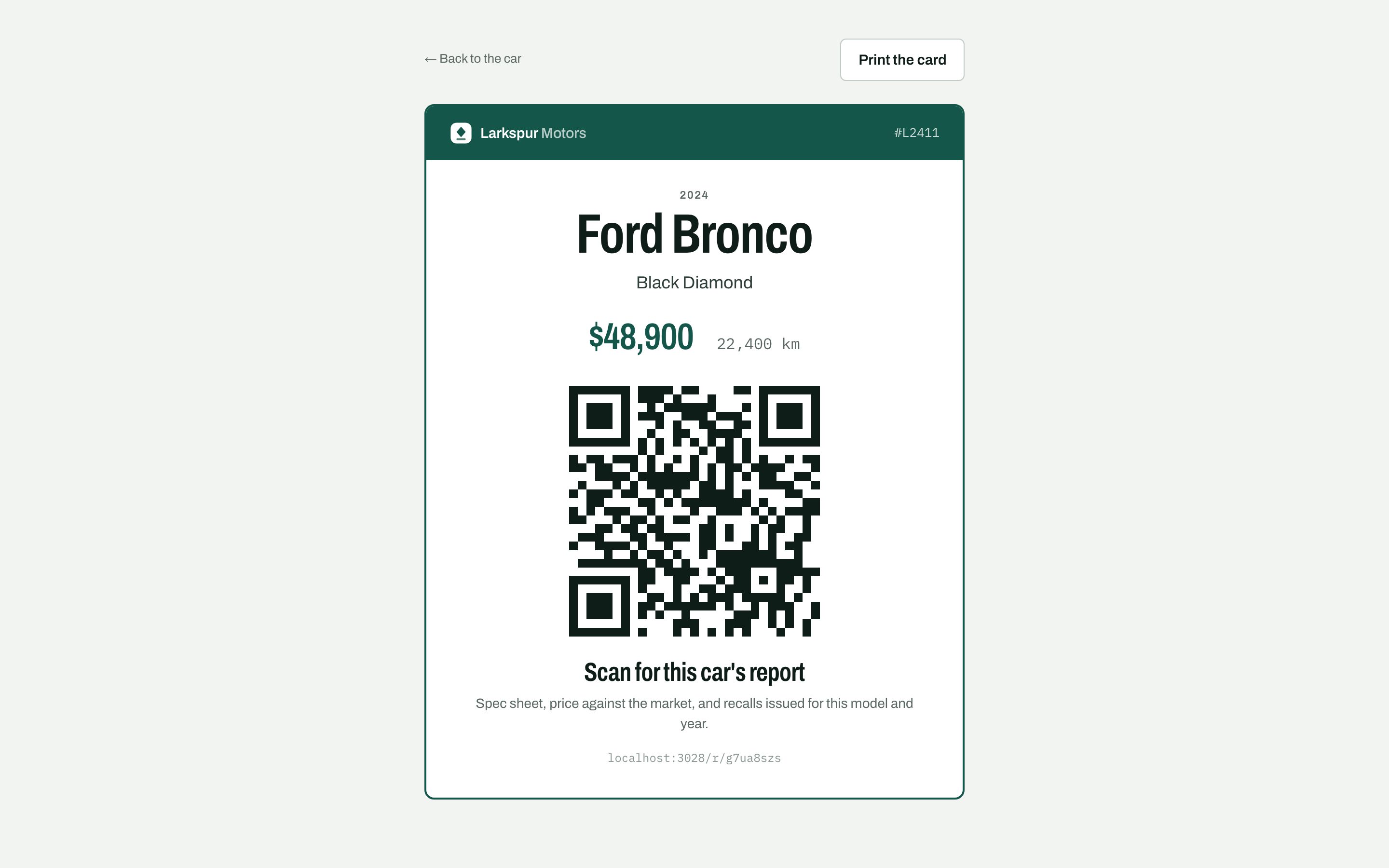
Each car gets a printable card with its price and a QR code for its report. The code carries ?src=qr, so the car's views chart tells a scan on the lot from a shared link.
src/app/(print)/lot/[id]/windshield/page.tsx
export default async function WindshieldPage({ params }: { params: Promise<{ id: string }> }) {
await requireStaff();
const { id } = await params;
const v = getVehicle(id);
if (!v) notFound();
const url = `${await publicOrigin()}/r/${v.publicId}?src=qr`;
const svg = await QRCode.toString(url, {
type: "svg",
margin: 0,
errorCorrectionLevel: "M",
color: { dark: "#0f1d19" },
});
return (
<div className="min-h-dvh bg-paper px-4 py-6 sm:py-10">
<div className="no-print mx-auto mb-6 flex max-w-[560px] flex-wrap items-center justify-between gap-3">
<Link href={`/lot/${v.id}`} className="text-[13px] text-muted hover:text-ink">
← Back to the car
</Link>
<PrintButton label="Print the card" />
</div>
{v.status !== "published" && (
<p className="no-print mx-auto mb-4 max-w-[560px] rounded-[6px] bg-amber-soft px-4 py-3 text-[13.5px] text-amber">
This report is not published, so the code will tell buyers it is not available. Publish it first.
</p>
)}
<article className="print-plain mx-auto max-w-[560px] overflow-hidden rounded-[10px] border-2 border-spruce bg-sheet">
<header className="print-exact flex items-center justify-between bg-spruce px-6 py-4">
<LarkspurWordmark tone="white" />
{v.stockNumber && <span className="figure text-[13px] text-white/80">#{v.stockNumber}</span>}
</header>
<div className="px-6 pb-8 pt-7 text-center sm:px-10">
<p className="eyebrow">{v.year}</p>
<h1 className="display mt-1 text-[3rem] text-ink sm:text-[3.6rem]">
{v.make} {v.model}
</h1>
{v.trim && <p className="mt-2 text-[18px] text-ink-2">{v.trim}</p>}
<div className="mt-6 flex items-baseline justify-center gap-6">
<p className="display text-[2.4rem] text-spruce">{v.askingPrice ? money(v.askingPrice) : ""}</p>
{v.odometerKm != null && <p className="figure text-[16px] text-muted">{km(v.odometerKm)}</p>}
</div>
<div
className="mx-auto mt-8 aspect-square w-[64%] max-w-[260px] [&>svg]:h-full [&>svg]:w-full"
role="img"
aria-label="QR code for this car's report"
dangerouslySetInnerHTML={{ __html: svg }}
/>
<p className="display mt-6 text-[1.7rem] text-ink">Scan for this car's report</p>
<p className="mt-2 text-[14px] text-muted">
Spec sheet, price against the market, and recalls issued for this model and year.
</p>
<p className="figure mt-4 text-[12px] text-faint">{url.replace(/^https?:\/\//, "").replace("?src=qr", "")}</p>
</div>
</article>
</div>
);
}
12. Deploy
The lot ships as one container with SQLite on a volume. Build the image, mount the volume, and set the key, the auth secret, the auth URL and PUBLIC_URL in the host's environment. On a serverless host, swap SQLite for a hosted database; the Cardog code does not change.
Dockerfile
# Larkspur lot reports: one container, SQLite on a mounted volume.
#   docker build -t larkspur-lot .
#   docker run -p 3028:3028 -v larkspur-data:/app/data \
#     -e CARDOG_API_KEY=... -e BETTER_AUTH_SECRET=... \
#     -e BETTER_AUTH_URL=https://lot.example.com -e PUBLIC_URL=https://lot.example.com larkspur-lot
FROM node:22-bookworm-slim AS build
WORKDIR /app
RUN corepack enable
COPY package.json pnpm-lock.yaml ./
RUN pnpm install --frozen-lockfile
COPY . .
RUN pnpm build

FROM node:22-bookworm-slim
WORKDIR /app
ENV NODE_ENV=production
RUN corepack enable
COPY --from=build /app ./
VOLUME /app/data
EXPOSE 3028
CMD ["pnpm", "start"]
terminal
docker build -t larkspur-lot .
docker run -p 3028:3028 -v larkspur-lot-data:/app/data \
  -e CARDOG_API_KEY=your_cardog_api_key \
  -e BETTER_AUTH_SECRET=$(openssl rand -base64 32) \
  -e BETTER_AUTH_URL=https://lot.example.com \
  -e PUBLIC_URL=https://lot.example.com \
  larkspur-lot
Next steps
- VIN decode: Every field the decode returns, and batch decoding.
- Window sticker: The factory sticker for a VIN, or the reason there is none.
- Recalls: Campaigns issued for a model and year.
Was this helpful?