Build guides
Build an insurance onboarding flow
Last updated:
Build Ottervale, an insurer's onboarding app on Next.js and better-auth: VIN entry, decode, confirm, prefilled details, a value range and an underwriter queue. See the use case.
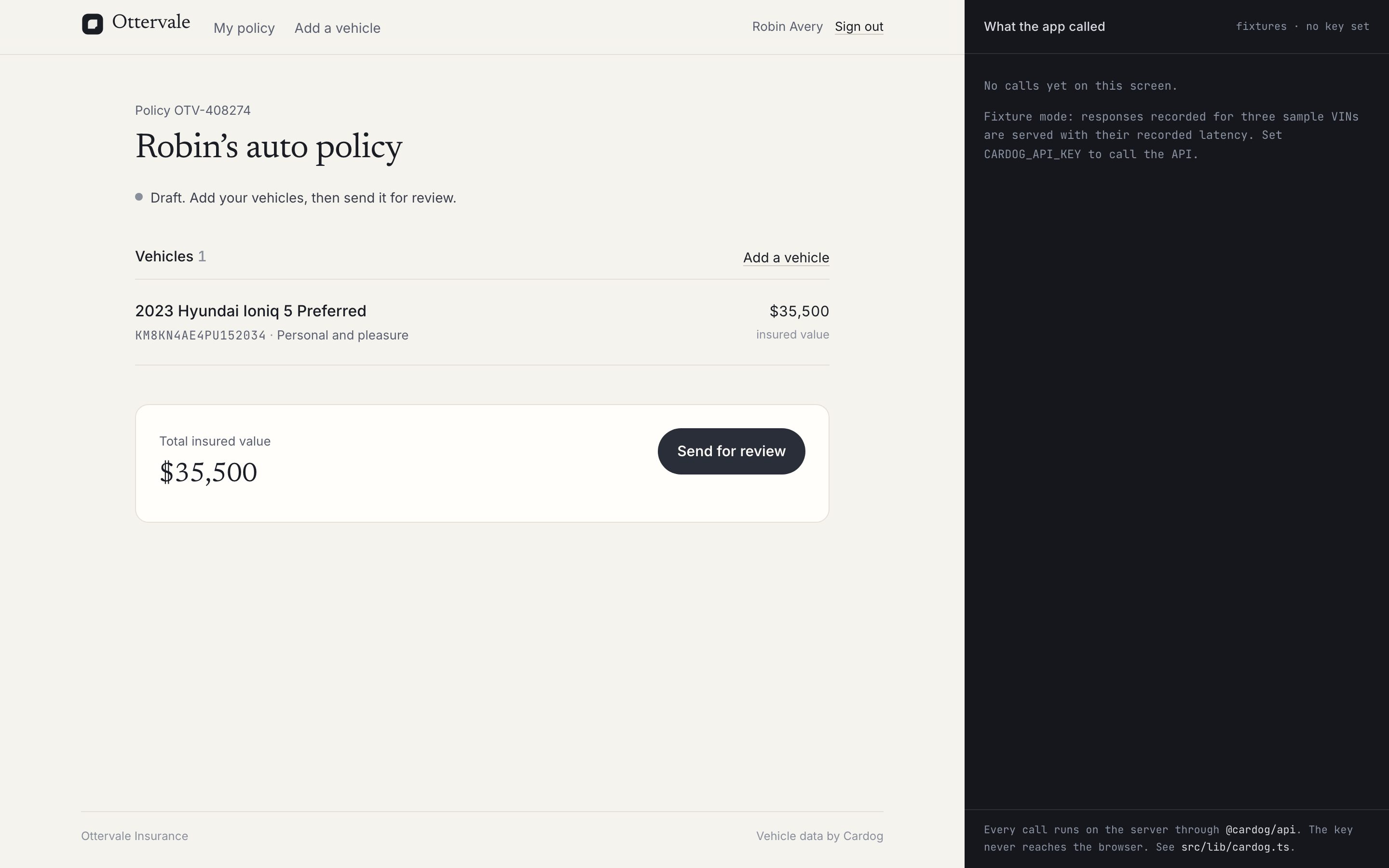
You'll build Ottervale, an auto insurer's app: applicants add a car by VIN and an underwriter reviews a prefilled file. See what it does.
- Time: About 45 minutes, or 5 to clone and run.
- You need: Node 20 or later and pnpm, A Cardog API key, Some Next.js
- Cardog SDK:
cardog.vin.image,cardog.v2.vin.getByVin,cardog.v2.specs.sheetByBuild,cardog.v2.safety.ratings,cardog.v2.quotes.getByRef,cardog.v2.recalls.entity - Clone the finished app: cardog-ai/example-insurance-onboarding, or build it step by step below.
git clone https://github.com/cardog-ai/example-insurance-onboarding.git1. Get an API key
Every request to Cardog carries a key. Create one under Account → API, then copy .env.example to .env.local. The app reads the key on the server; the browser never sees it.
The example values run as shipped. Without a key the app runs on responses recorded for three VINs, so you can follow along before you sign up.
BETTER_AUTH_SECRET ships as a development placeholder, so a fresh clone builds and runs. Replace it with your own (openssl rand -base64 32) before you deploy: a production server will not start without one, and warns on every start while the placeholder is set.
.env.example
# Copy to .env.local. With these values the app runs on recorded fixtures
# and a development auth secret.

# Your Cardog API key (https://cardog.app/account/api). Server-side only; it
# never reaches the browser. Leave empty for fixture mode.
CARDOG_API_KEY=

# Signs sessions. This value is a DEVELOPMENT PLACEHOLDER so a fresh clone
# builds and runs; the app warns on every production start while it is set.
# Replace it before deploying: openssl rand -base64 32
BETTER_AUTH_SECRET=ottervale-dev-only-secret-replace-before-deploying

# Where the app is served. Needed when it is not http://localhost:3020.
BETTER_AUTH_URL=http://localhost:3020

# SQLite file. Created on first run.
DATABASE_PATH=data/ottervale.db

# Seeded review logins (created by `pnpm db:setup` on an empty database):
#   applicant    applicant@ottervale.example   / ottervale-applicant
#   underwriter  underwriter@ottervale.example / ottervale-underwriter
2. Create the Next.js app
Ottervale is one Next.js app: the applicant's screens, the underwriter's queue, and the server code that talks to Cardog. SQLite keeps it to one process with nothing else to run. better-sqlite3 is a native module, so the config loads it at runtime.
terminal
pnpm create next-app@latest ottervale --ts --app --tailwind --src-dir
cd ottervale
pnpm add @cardog/api better-auth better-sqlite3 drizzle-orm server-only
pnpm add -D drizzle-kit tsx @types/better-sqlite3
next.config.ts
import type { NextConfig } from "next";

const nextConfig: NextConfig = {
  // better-sqlite3 is a native module: load it from node_modules at runtime.
  serverExternalPackages: ["better-sqlite3"],
  // This app is its own root, even when it sits inside another repository.
  outputFileTracingRoot: process.cwd(),
};

export default nextConfig;
3. Add sign-in with better-auth
Applicants and underwriters sign in with email and password. Sessions live in the same SQLite file as the policies. role is a user field that sign-up cannot set, so nobody makes themselves an underwriter from the form.
authSecret() picks the secret that signs sessions: yours whenever BETTER_AUTH_SECRET is set, and the development placeholder only on your machine and during next build. A production server with no secret stops, and one still on the placeholder logs a warning.
src/lib/auth.ts
function authSecret(): string {
  const set = process.env.BETTER_AUTH_SECRET?.trim();
  const production = process.env.NODE_ENV === "production" && process.env.NEXT_PHASE !== "phase-production-build";
  if (set) {
    if (production && set === DEV_SECRET) {
      console.warn("[ottervale] BETTER_AUTH_SECRET is the development placeholder. Replace it before deploying.");
    }
    return set;
  }
  if (!production) return DEV_SECRET;
  throw new Error("[ottervale] BETTER_AUTH_SECRET is not set. Generate one with `openssl rand -base64 32`.");
}
src/lib/auth.ts
export const auth = betterAuth({
  appName: "Ottervale",
  baseURL: process.env.BETTER_AUTH_URL || "http://localhost:3020",
  secret: authSecret(),
  database: drizzleAdapter(db, {
    provider: "sqlite",
    schema: { user: schema.user, session: schema.session, account: schema.account, verification: schema.verification },
  }),
  emailAndPassword: { enabled: true, minPasswordLength: 8, autoSignIn: true },
  user: {
    additionalFields: {
      role: { type: "string", required: false, defaultValue: "applicant", input: false },
    },
  },
  plugins: [nextCookies()],
});
src/app/api/auth/[...all]/route.ts
import { toNextJsHandler } from "better-auth/next-js";
import { auth } from "@/lib/auth";

export const { GET, POST } = toNextJsHandler(auth);
4. Construct the Cardog client on the server
One file holds every Cardog call. The client is built once from the key, and the server-only import fails the build if a browser bundle ever reaches for it. Each call is timed and logged, which is what the app's "What the app called" pane shows.
SDK call: new CardogClient({ apiKey, appId })
src/lib/cardog.ts
const apiKey = process.env.CARDOG_API_KEY?.trim();

/** The one Cardog client. Server-side only. */
export const cardog: CardogClient | null = apiKey
  ? new CardogClient({ apiKey, appId: "ottervale-onboarding", baseUrl: process.env.CARDOG_BASE_URL || undefined })
  : null;

export const dataMode: "live" | "fixture" = cardog ? "live" : "fixture";
export { FIXTURE_VINS };

// The v2 response types, read off the client's own method signatures.
type V2 = CardogClient["v2"];
export type VinIdentity = Awaited<ReturnType<V2["vin"]["getByVin"]>>;
export type BuildSpecSheet = Awaited<ReturnType<V2["specs"]["sheetByBuild"]>>;
export type SafetyRatings = Awaited<ReturnType<V2["safety"]["ratings"]>>;
export type MarketQuote = Awaited<ReturnType<V2["quotes"]["getByRef"]>>;
export type ModelYearRecalls = Awaited<ReturnType<V2["recalls"]["entity"]>>;
export type VinImageRead = Awaited<ReturnType<CardogClient["vin"]["image"]>>;

export interface Result<T> {
  data: T | null;
  call: CallRecord;
  error: string | null;
}
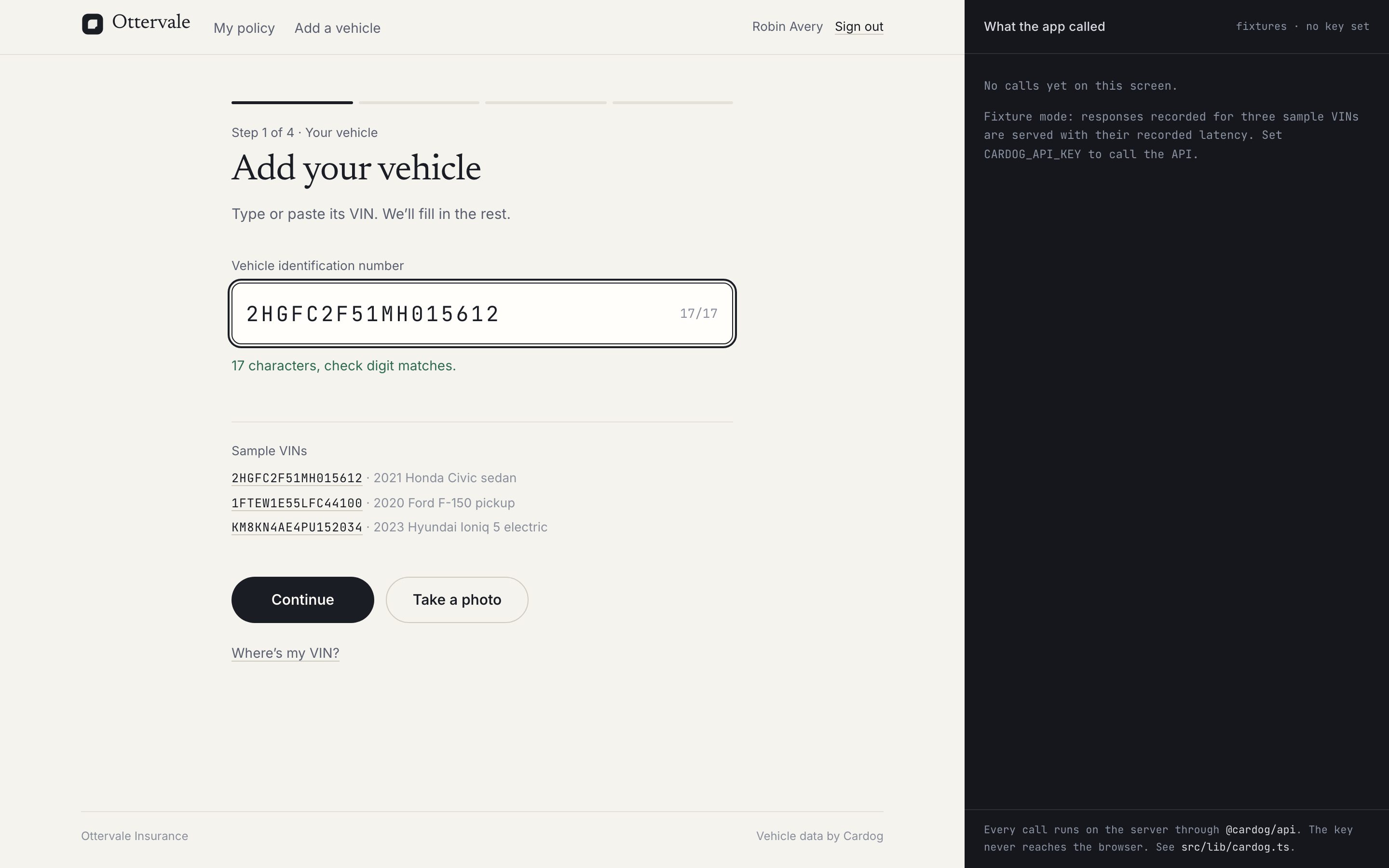
5. Check the VIN as it is typed
Most bad VINs are typos, and the ninth character catches them. Check it in the browser before spending a request: an I or O is almost always a 1 or 0, and a check digit that does not add up means a character is wrong.
src/lib/vin.ts
export function checkVin(vin: string): VinCheck {
  if (!vin) return { state: "empty" };
  const bad = vin.match(/[IOQ]/);
  if (bad) {
    const hint = bad[0] === "I" ? "1" : "0";
    return { state: "invalid", message: `VINs never use the letter ${bad[0]}. It's probably the number ${hint}.` };
  }
  if (/[^A-HJ-NPR-Z0-9]/.test(vin)) return { state: "invalid", message: "Only letters and numbers." };
  if (vin.length < 17) return { state: "typing", remaining: 17 - vin.length };
  const expected = expectedCheckDigit(vin);
  if (expected && expected !== vin[8]) {
    return {
      state: "check-mismatch",
      message: `The 9th character should be ${expected} for this VIN. Check for a mistyped character.`,
    };
  }
  return { state: "ok", message: "17 characters, check digit matches." };
}
6. Read the VIN from a photo
Typing seventeen characters on a phone is where applicants give up. Let them photograph the door-jamb sticker instead; the route sends the image from the server and returns the VIN, which then goes through the same check as a typed one.
SDK call: cardog.vin.image(base64)
What comes back. success and result, the VIN read from the photo.
src/lib/cardog.ts
export async function readVinFromImage(base64: string, step: string): Promise<Result<VinImageRead>> {
  return run<VinImageRead>({
    step,
    vin: FIXTURE_VINS[0].vin,
    key: "image",
    method: "cardog.vin.image",
    args: [`<${Math.round((base64.length * 3) / 4 / 1024)} KB image, base64>`],
    http: "POST /vin/image",
    returns: "The VIN read from the photo",
    live: (c) => c.vin.image(base64),
  });
}
src/app/api/vehicle/photo/route.ts
import { NextResponse } from "next/server";
import { getViewer } from "@/lib/session";
import { readVinFromImage } from "@/lib/cardog";
import { normalizeVin } from "@/lib/vin";

const MAX_BYTES = 8 * 1024 * 1024;

/** POST multipart { photo } → the VIN read from it. */
export async function POST(req: Request) {
  const me = await getViewer();
  if (!me) return NextResponse.json({ ok: false, error: "Sign in first." }, { status: 401 });
  const form = await req.formData().catch(() => null);
  const file = form?.get("photo");
  if (!(file instanceof File)) return NextResponse.json({ ok: false, error: "No photo received." }, { status: 400 });
  if (file.size > MAX_BYTES)
    return NextResponse.json({ ok: false, error: "That photo is over 8 MB." }, { status: 413 });

  const base64 = Buffer.from(await file.arrayBuffer()).toString("base64");
  const r = await readVinFromImage(base64, "Add your vehicle");
  const vin = r.data?.success ? normalizeVin(r.data.result) : null;
  return NextResponse.json({
    ok: Boolean(vin && vin.length === 17),
    vin,
    error:
      vin && vin.length === 17
        ? null
        : r.error ?? "We couldn't find a VIN in that photo. Try again closer, or type it.",
    calls: [r.call],
  });
}
7. Decode the VIN
Send the VIN from a route handler, never from the browser. The decode returns the vehicle and the refs every other call takes.
SDK call: cardog.v2.vin.getByVin(vin)
What comes back. Year, make, model and trim, the decoded attributes, and refs such as refs.modelYear and nano, the build code.
src/lib/cardog.ts
export function decodeVin(vin: string, step: string) {
  return run<VinIdentity>({
    step,
    vin,
    key: "decode",
    method: "cardog.v2.vin.getByVin",
    args: [vin],
    http: `GET /v2/vin/${vin}`,
    returns: "Identity card: year, make, model, trim, refs, nano, decoded attributes",
    live: (c) => c.v2.vin.getByVin(vin),
  });
}
src/app/api/vehicle/identify/route.ts
import { NextResponse } from "next/server";
import { getViewer } from "@/lib/session";
import { identify } from "@/lib/vehicle-read";
import { normalizeVin } from "@/lib/vin";

/** POST { vin } → decode + build spec sheet. Signed-in applicants only. */
export async function POST(req: Request) {
  const me = await getViewer();
  if (!me) return NextResponse.json({ ok: false, error: "Sign in first." }, { status: 401 });
  const { vin } = (await req.json().catch(() => ({}))) as { vin?: string };
  const v = normalizeVin(vin ?? "");
  if (v.length !== 17) return NextResponse.json({ ok: false, error: "A VIN has 17 characters." }, { status: 400 });
  return NextResponse.json(await identify(me.id, v));
}
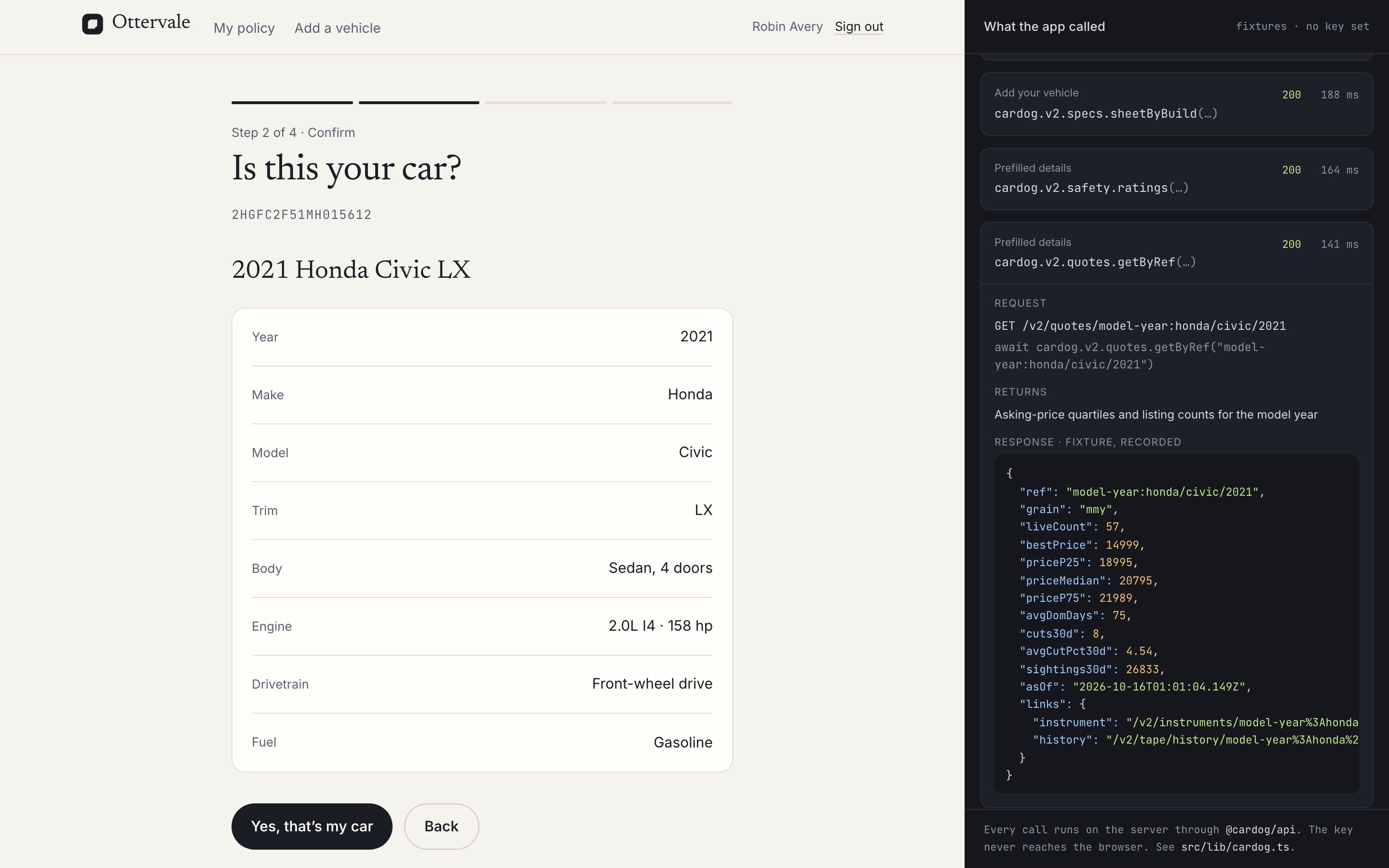
8. Ask the applicant to confirm
Read the build's spec sheet next. It lists every catalogue trim linked to this build; when there is more than one, the VIN alone does not settle it, so the screen asks.
SDK call: cardog.v2.specs.sheetByBuild(nano)
What comes back. Spec values by section, each with its source, and trims: the catalogue trims this build can be.
src/lib/vehicle-read.ts
export async function identify(userId: string, vin: string, step = "Add your vehicle"): Promise<ReadResult> {
  const d = draftFor(userId, vin);
  d.raw = { decode: null, specs: null, safety: null, quote: null };
  d.calls = [];

  const decoded = await decodeVin(vin, step);
  d.calls.push(decoded.call);
  if (!decoded.data) return { ok: false, error: decoded.error, facts: null, calls: [decoded.call] };
  d.raw.decode = decoded.data;

  const calls = [decoded.call];
  if (decoded.data.nano) {
    const specs = await readBuildSpecs(decoded.data.nano, vin, step);
    d.calls.push(specs.call);
    calls.push(specs.call);
    d.raw.specs = specs.data;
  }
  d.at = Date.now();
  return { ok: true, error: null, facts: facts(vin, d.raw), calls };
}
9. Prefill the details an insurer asks for
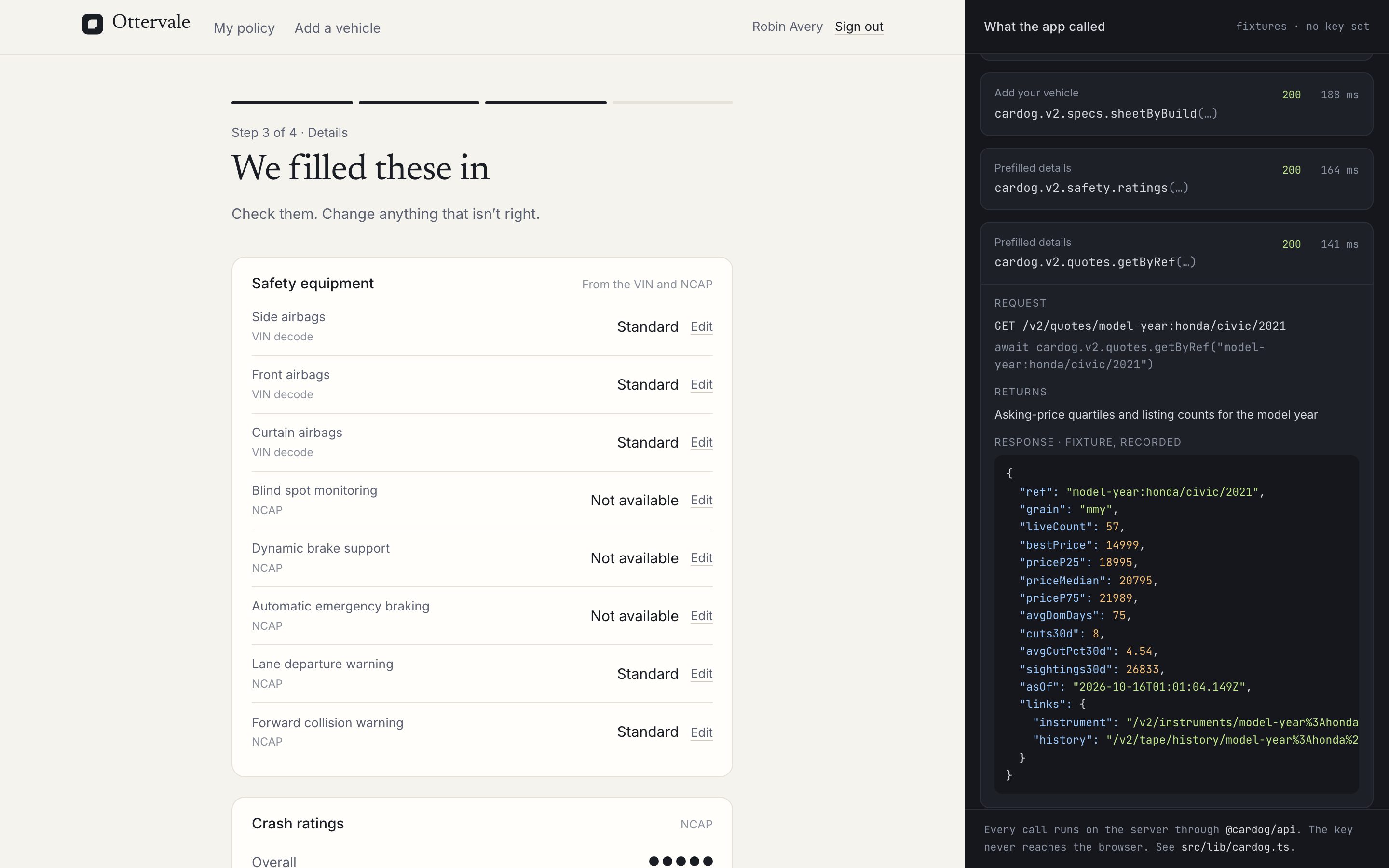
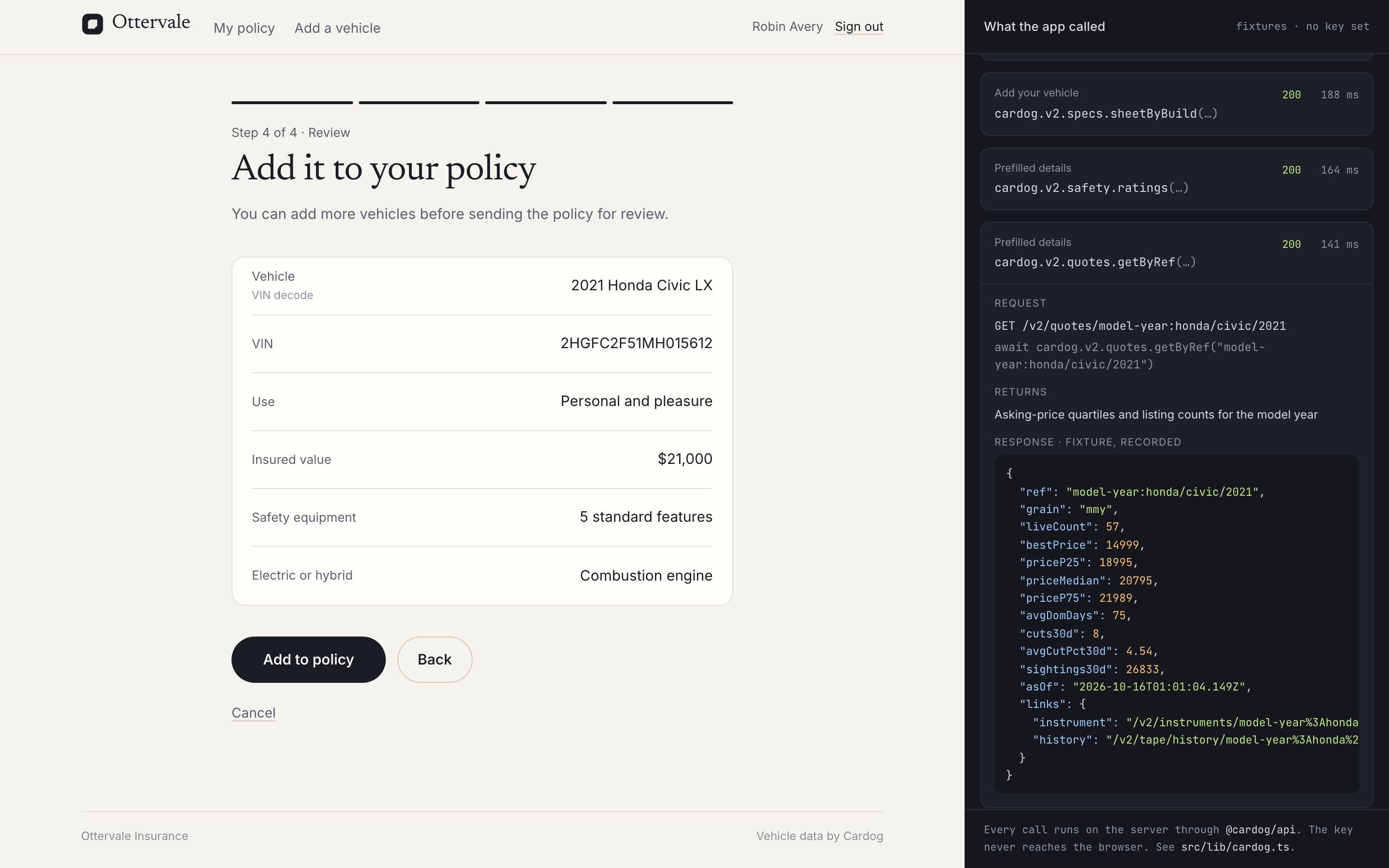
When the details screen opens, read the crash ratings and the market quote for the model year in parallel. The applicant reviews answers instead of typing them.
SDK call: cardog.v2.safety.ratings(modelYearRef)
What comes back. best, the rating for the closest configuration, and every rating row with its listed safety equipment.
src/lib/vehicle-read.ts
export async function details(userId: string, vin: string, step = "Prefilled details"): Promise<ReadResult> {
  const d = draftFor(userId, vin);
  if (!d.raw.decode) {
    const r = await identify(userId, vin, step);
    if (!r.ok) return r;
  }
  const modelYear = (d.raw.decode as { refs?: { modelYear?: string | null } }).refs?.modelYear;
  if (!modelYear) return { ok: true, error: null, facts: facts(vin, d.raw), calls: [] };

  const [safety, quote] = await Promise.all([
    readSafetyRatings(modelYear, vin, step),
    readMarketQuote(modelYear, vin, step),
  ]);
  d.raw.safety = safety.data;
  d.raw.quote = quote.data;
  d.calls.push(safety.call, quote.call);
  d.at = Date.now();
  return { ok: true, error: null, facts: facts(vin, d.raw), calls: [safety.call, quote.call] };
}
10. Show a market value range
The quote is the asking prices of live listings for the model year. Show the middle half as the estimated value and let the applicant set the insured value inside it.
SDK call: cardog.v2.quotes.getByRef(modelYearRef)
What comes back. priceP25, priceMedian and priceP75, the live listing count and asOf.
src/lib/cardog.ts
export function readMarketQuote(modelYearRef: string, vin: string, step: string) {
  return run<MarketQuote>({
    step,
    vin,
    key: "quote",
    method: "cardog.v2.quotes.getByRef",
    args: [modelYearRef],
    http: `GET /v2/quotes/${modelYearRef}`,
    returns: "Asking-price quartiles and listing counts for the model year",
    live: (c) => c.v2.quotes.getByRef(modelYearRef),
  });
}
11. Save the vehicle to the policy
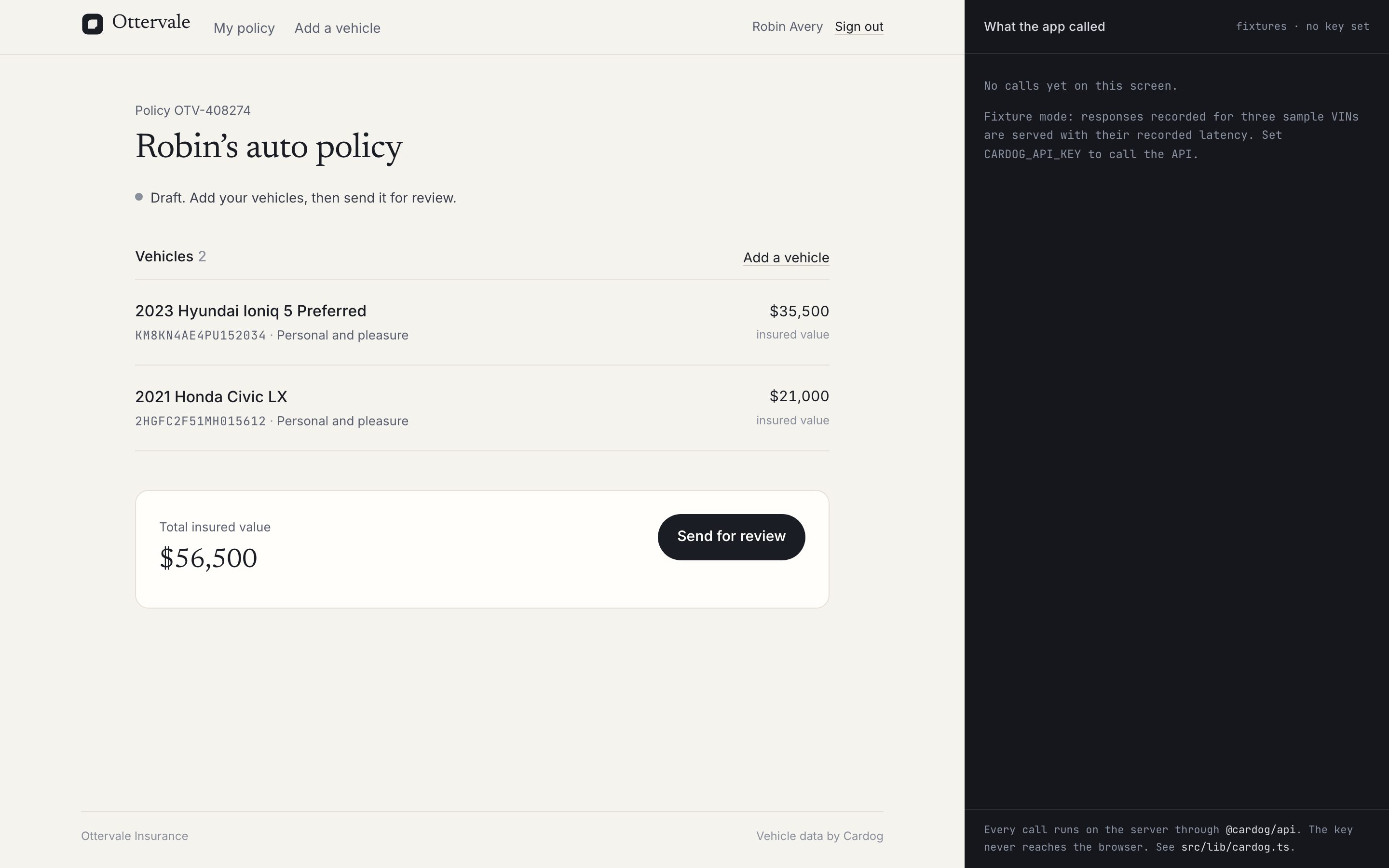
Saving reuses the reads the applicant just saw, held for an hour, so a vehicle is not paid for twice. The row keeps the facts, the applicant's answers and the log of calls behind them.
src/app/actions.ts
export async function addVehicle(input: {
  vin: string;
  answers: Answers;
  manual?: { year: number | null; make: string; model: string; trim: string };
}): Promise<ActionResult> {
  const me = await requireViewer();
  const p = await policyFor(me.id);
  if (!editable(p.status))
    return { ok: false, error: "This policy is with underwriting. Vehicles can be added once it comes back." };

  const vin = normalizeVin(input.vin);
  if (vin.length !== 17) return { ok: false, error: "A VIN has 17 characters." };
  if (vehiclesOn(p.id).some((v) => v.vin === vin))
    return { ok: false, error: "This vehicle is already on your policy." };

  let facts;
  let calls: CallRecord[] = [];
  if (input.manual) {
    facts = manualVehicleFile(vin, input.manual);
  } else {
    // Reuse what the applicant saw; read again only if it has expired.
    const held = heldDraft(me.id, vin);
    if (held) {
      facts = held.facts;
      calls = held.calls;
    } else {
      const r = await readAll(me.id, vin, "Add to policy");
      if (!r.ok || !r.facts) return { ok: false, error: r.error ?? "The vehicle could not be read." };
      facts = r.facts;
      calls = r.allCalls;
    }
  }

  const now = new Date();
  db.insert(vehicle)
    .values({
      id: crypto.randomUUID(),
      policyId: p.id,
      vin,
      source: input.manual ? "manual" : "cardog",
      year: facts.year,
      make: facts.make,
      model: facts.model,
      trim: input.answers.trim ?? facts.trim,
      facts,
      answers: input.answers,
      calls,
      refreshedAt: now,
    })
    .run();
  db.update(policy).set({ updatedAt: now }).where(eq(policy.id, p.id)).run();
  dropDraft(me.id, vin);
  revalidatePath("/policy");
  return { ok: true };
}
12. Build the underwriter queue
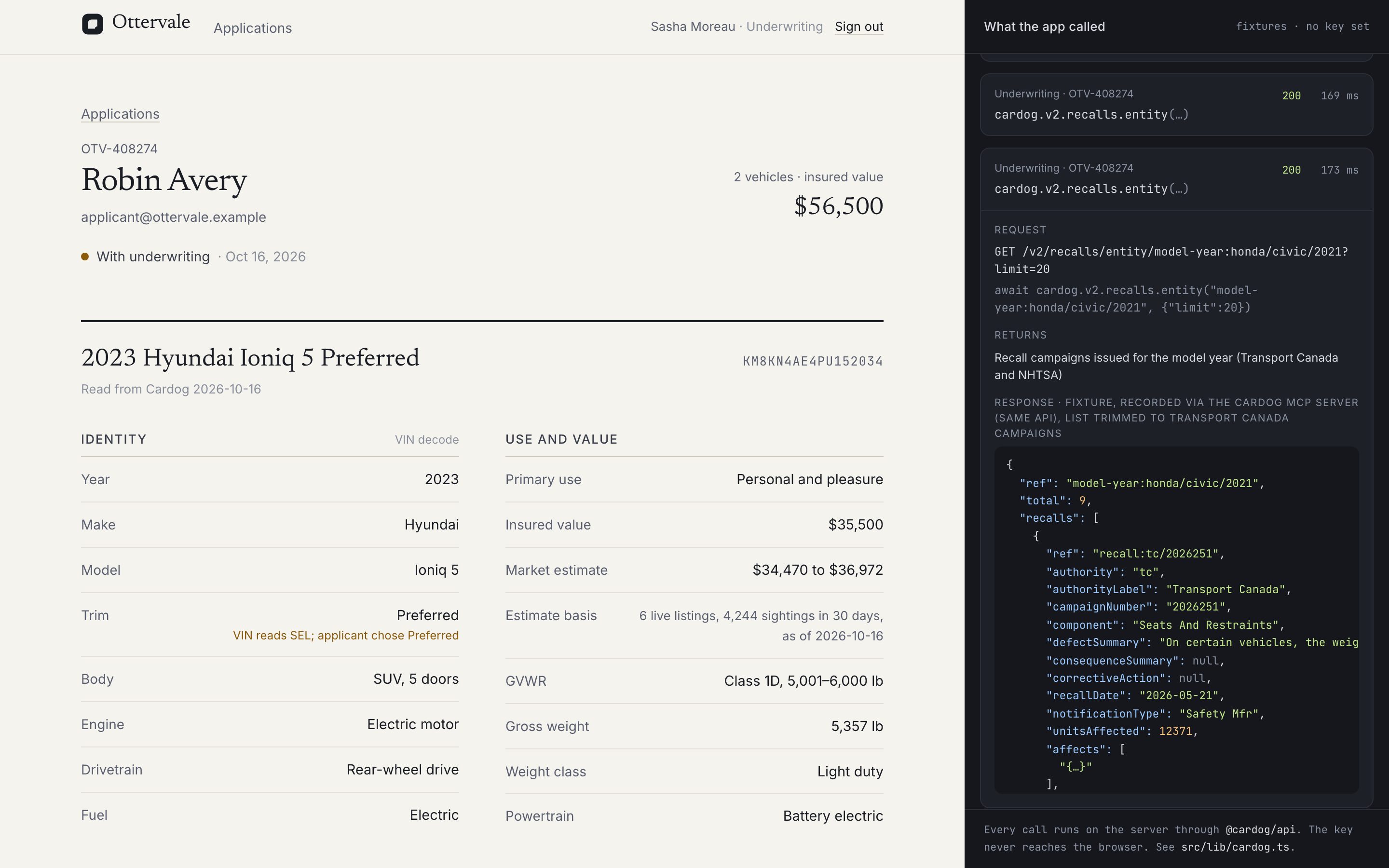
Submitted policies land in a queue. The underwriter opens each application, sees every vehicle's file with the recalls issued for its model and year, and approves the policy or refers it back with a note.
SDK call: cardog.v2.recalls.entity(modelYearRef)
What comes back. Transport Canada and NHTSA campaigns issued for the model and year. They are matched by model year, and the underwriting view says so.
src/lib/cardog.ts
export function readModelYearRecalls(modelYearRef: string, vin: string, step: string) {
  return run<ModelYearRecalls>({
    step,
    vin,
    key: "recalls",
    method: "cardog.v2.recalls.entity",
    args: [modelYearRef, { limit: 20 }],
    http: `GET /v2/recalls/entity/${modelYearRef}?limit=20`,
    returns: "Recall campaigns issued for the model year (Transport Canada and NHTSA)",
    live: (c) => c.v2.recalls.entity(modelYearRef, { limit: 20 }),
  });
}
src/lib/policy.ts
export function queue() {
  const rows = db
    .select({ policy, applicant: { id: user.id, name: user.name, email: user.email } })
    .from(policy)
    .innerJoin(user, eq(user.id, policy.userId))
    .where(ne(policy.status, "draft"))
    .orderBy(desc(policy.submittedAt))
    .all();
  const ids = rows.map((r) => r.policy.id);
  const vs = ids.length ? db.select().from(vehicle).where(inArray(vehicle.policyId, ids)).all() : [];
  return rows.map((r) => ({ ...r, vehicles: vs.filter((v) => v.policyId === r.policy.id) }));
}
src/app/actions.ts
export async function decidePolicy(
  policyId: string,
  decision: "approved" | "referred",
  note: string
): Promise<ActionResult> {
  const uw = await requireUnderwriter();
  const p = db.select().from(policy).where(eq(policy.id, policyId)).get();
  if (!p || p.status !== "submitted") return { ok: false, error: "This application is not waiting for a decision." };
  db.update(policy)
    .set({ status: decision, decidedAt: new Date(), decidedBy: uw.name, decisionNote: note.trim() || null })
    .where(eq(policy.id, policyId))
    .run();
  revalidatePath("/underwriting");
  revalidatePath(`/underwriting/${policyId}`);
  return { ok: true };
}
13. Deploy
Ottervale ships as one container with SQLite on a volume. Build the image, mount the volume, and set the key, the auth secret and the public URL in the host's environment. On a serverless host, swap SQLite for a hosted database; the Cardog code does not change.
Dockerfile
# Ottervale onboarding: one container, SQLite on a mounted volume.
#   docker build -t ottervale .
#   docker run -p 3020:3020 -v ottervale-data:/app/data \
#     -e CARDOG_API_KEY=... -e BETTER_AUTH_SECRET=... -e BETTER_AUTH_URL=https://your.host ottervale
FROM node:22-bookworm-slim AS build
WORKDIR /app
RUN corepack enable
COPY package.json pnpm-lock.yaml ./
RUN pnpm install --frozen-lockfile
COPY . .
RUN pnpm build

FROM node:22-bookworm-slim
WORKDIR /app
ENV NODE_ENV=production
RUN corepack enable
COPY --from=build /app ./
VOLUME /app/data
EXPOSE 3020
CMD ["pnpm", "start"]
terminal
docker build -t ottervale .
docker run -p 3020:3020 -v ottervale-data:/app/data \
  -e CARDOG_API_KEY=your_cardog_api_key \
  -e BETTER_AUTH_SECRET=$(openssl rand -base64 32) \
  -e BETTER_AUTH_URL=https://onboarding.example.com \
  ottervale
Next steps
- VIN decode: Every field the decode returns.
- Market data: Quotes, comparables and the price history behind them.
- Feeds: Re-read saved vehicles on a schedule.
Was this helpful?