Build guides
Build an EV charging map
Last updated:
Build Kitebay, a charging network's driver app on Next.js, better-auth and MapLibre: add an EV by VIN, a map of the stations it can use, favourites and trips, and a network admin. See the use case.
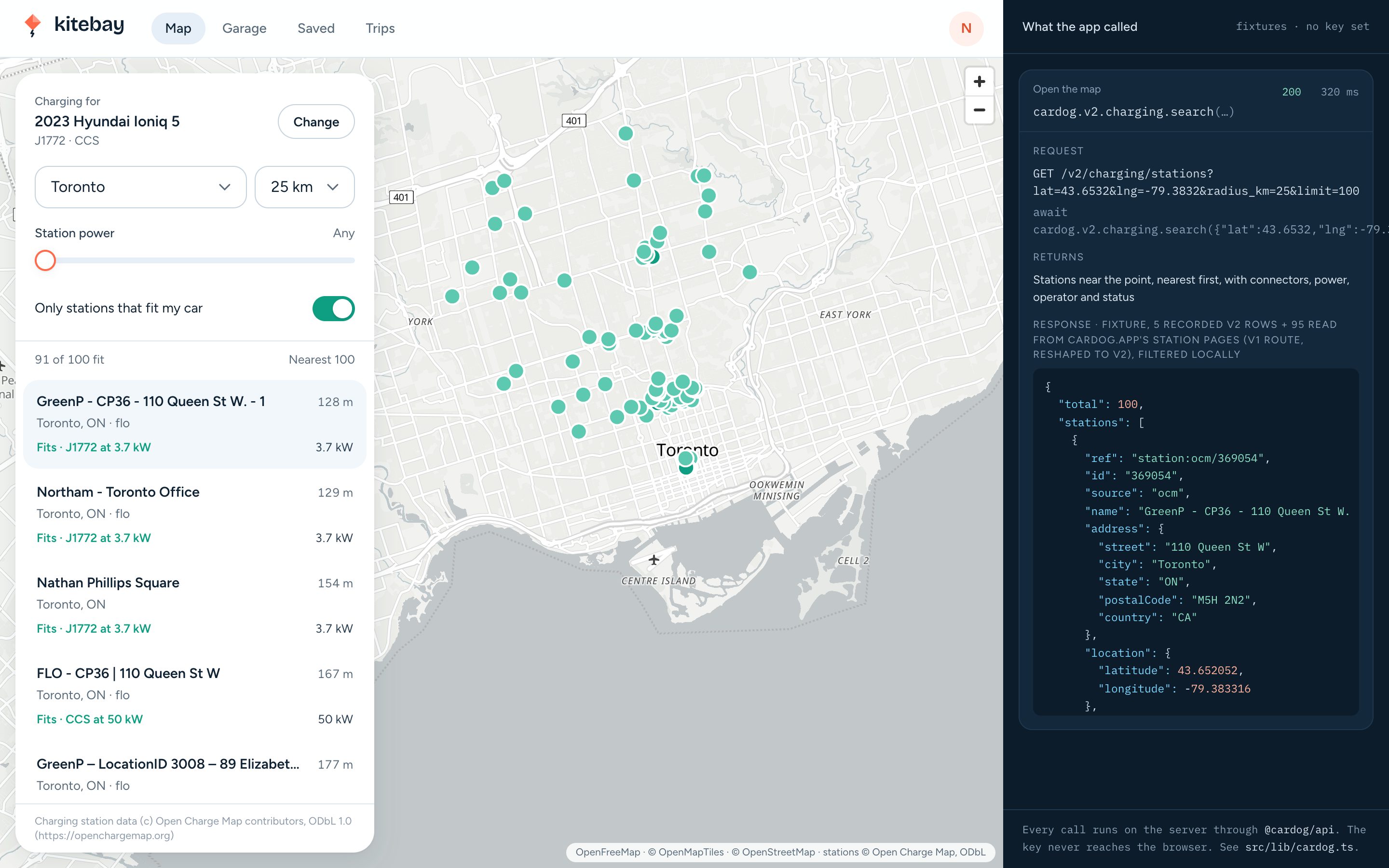
You'll build Kitebay, a charging network's app: drivers add their EV by VIN and see the stations it can use. See what it does.
- Time: About 45 minutes, or 5 to clone and run.
- You need: Node 20 or later and pnpm, A Cardog API key, Some Next.js
- Cardog SDK:
cardog.v2.vin.getByVin,cardog.v2.specs.sheetByBuild,cardog.v2.charging.search,cardog.v2.charging.station - Clone the finished app: cardog-ai/example-ev-charging-map, or build it step by step below.
git clone https://github.com/cardog-ai/example-ev-charging-map.git1. Get an API key
Every request to Cardog carries a key. Create one under Account → API, then copy .env.example to .env.local. The app reads the key on the server; the browser never sees it.
The example values run as shipped. Without a key the app runs on four recorded vehicles and a corpus of stations from Toronto to Montreal, searched by the API's own rules, so you can follow along before you sign up.
BETTER_AUTH_SECRET ships as a development placeholder, so a fresh clone builds and runs. Replace it with your own (openssl rand -base64 32) before you deploy: a production server will not start without one, and warns on every start while the placeholder is set.
.env.example
# Copy to .env.local. With these values the app runs on recorded fixtures
# and a development auth secret.

# Your Cardog API key (https://cardog.app/account/api). Server-side only; it
# never reaches the browser. Leave empty for fixture mode.
CARDOG_API_KEY=

# Signs sessions. This value is a DEVELOPMENT PLACEHOLDER so a fresh clone
# builds and runs; the app warns on every production start while it is set.
# Replace it before deploying: openssl rand -base64 32
BETTER_AUTH_SECRET=kitebay-dev-only-secret-replace-before-deploying

# Where the app is served. Needed when it is not http://localhost:3025.
BETTER_AUTH_URL=http://localhost:3025

# SQLite file. Created on first run.
DATABASE_PATH=data/kitebay.db

# The map's style. Any MapLibre style URL works; the default needs no key.
NEXT_PUBLIC_MAP_STYLE=https://tiles.openfreemap.org/styles/positron

# Seeded review logins (created by `pnpm db:setup` on an empty database):
#   driver   driver@kitebay.example / kitebay-driver
#   admin    admin@kitebay.example  / kitebay-admin
2. Create the Next.js app
Kitebay is one Next.js app: the driver's map, garage, favourites and trips, the network admin, and the server code that talks to Cardog. The map is MapLibre GL on OpenFreeMap tiles, so there is no map key. SQLite keeps it to one process; better-sqlite3 is a native module, so the config loads it at runtime.
terminal
pnpm create next-app@latest kitebay --ts --app --tailwind --src-dir
cd kitebay
pnpm add @cardog/api better-auth better-sqlite3 drizzle-orm maplibre-gl server-only
pnpm add -D drizzle-kit tsx @types/better-sqlite3
next.config.ts
import type { NextConfig } from "next";

const nextConfig: NextConfig = {
  // better-sqlite3 is a native module: load it from node_modules at runtime.
  serverExternalPackages: ["better-sqlite3"],
  // This app is its own root, even when it sits inside another repository.
  outputFileTracingRoot: process.cwd(),
  // The dev badge sits on top of the map's corner; keep it out of the way.
  devIndicators: false,
};

export default nextConfig;
3. Add sign-in and roles
Drivers and network admins sign in with email and password. role is a user field sign-up cannot set, so every sign-up is a driver.
authSecret() picks the secret that signs sessions: yours whenever BETTER_AUTH_SECRET is set, and the development placeholder only on your machine and during next build. A production server with no secret stops, and one still on the placeholder logs a warning.
src/lib/auth.ts
function authSecret(): string {
  const set = process.env.BETTER_AUTH_SECRET?.trim();
  const production = process.env.NODE_ENV === "production" && process.env.NEXT_PHASE !== "phase-production-build";
  if (set) {
    if (production && set === DEV_SECRET) {
      console.warn("[kitebay] BETTER_AUTH_SECRET is the development placeholder. Replace it before deploying.");
    }
    return set;
  }
  if (!production) return DEV_SECRET;
  throw new Error("[kitebay] BETTER_AUTH_SECRET is not set. Generate one with `openssl rand -base64 32`.");
}
src/lib/auth.ts
export const auth = betterAuth({
  appName: "Kitebay",
  baseURL: process.env.BETTER_AUTH_URL || "http://localhost:3025",
  secret: authSecret(),
  database: drizzleAdapter(db, {
    provider: "sqlite",
    schema: { user: schema.user, session: schema.session, account: schema.account, verification: schema.verification },
  }),
  emailAndPassword: { enabled: true, minPasswordLength: 8, autoSignIn: true },
  user: {
    additionalFields: {
      role: { type: "string", required: false, defaultValue: "driver", input: false },
    },
  },
  plugins: [nextCookies()],
});
src/app/api/auth/[...all]/route.ts
import { toNextJsHandler } from "better-auth/next-js";
import { auth } from "@/lib/auth";

export const { GET, POST } = toNextJsHandler(auth);
4. Construct the Cardog client on the server
One file holds every Cardog call. The client is built once from the key, and the server-only import fails the build if a browser bundle reaches for it. Each call is timed and logged, which is what the "What the app called" pane shows.
SDK call: new CardogClient({ apiKey, appId })
src/lib/cardog.ts
const apiKey = process.env.CARDOG_API_KEY?.trim();

/** The one Cardog client. Server-side only. */
export const cardog: CardogClient | null = apiKey
  ? new CardogClient({ apiKey, appId: "kitebay-charging-map", baseUrl: process.env.CARDOG_BASE_URL || undefined })
  : null;

export const dataMode: "live" | "fixture" = cardog ? "live" : "fixture";
export { FIXTURE_VINS };

export type * from "./cardog-types";

export interface Result<T> {
  data: T | null;
  call: CallRecord;
  error: string | null;
}
5. Check the VIN as it is typed
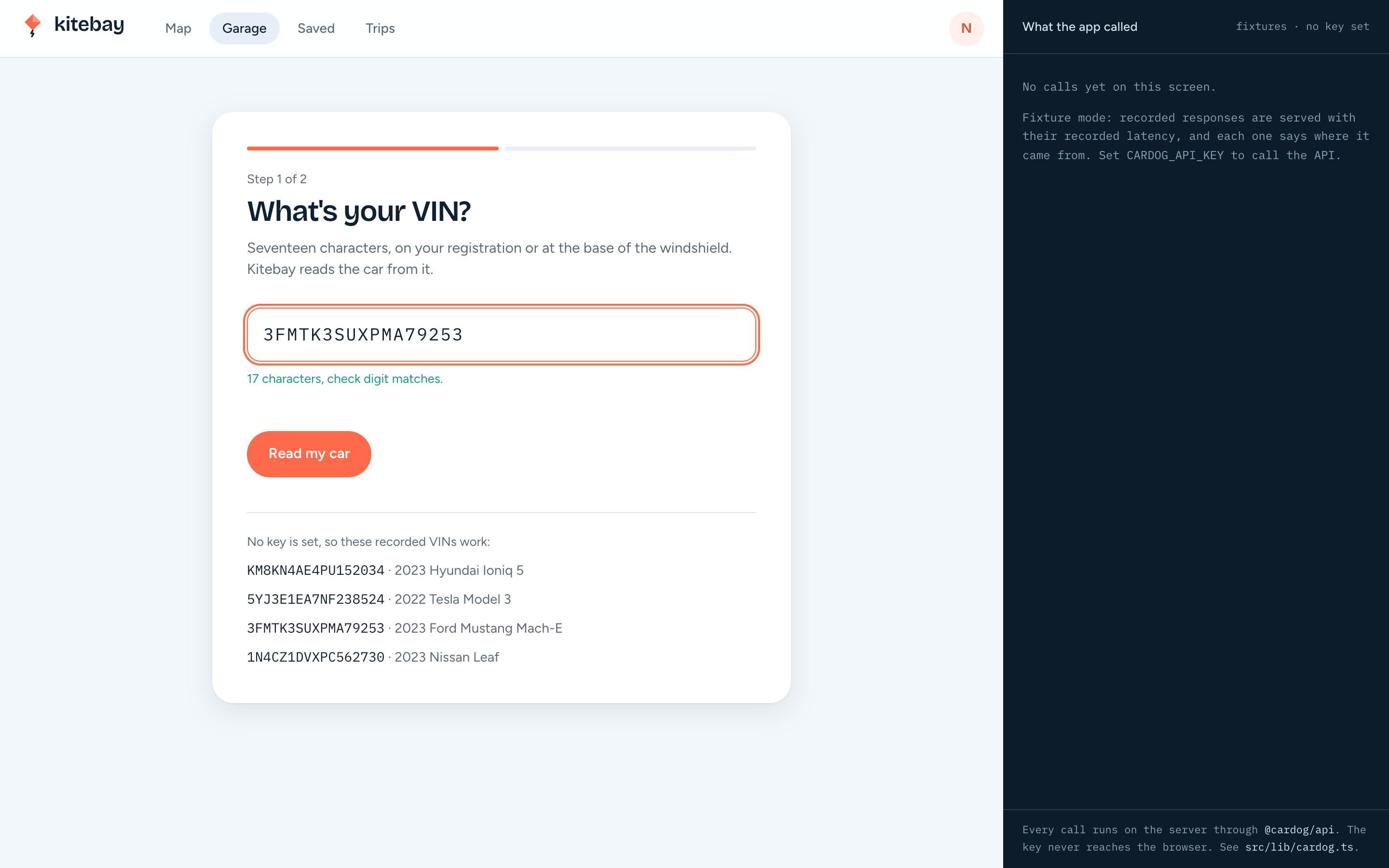
Count to seventeen and check the ninth character before spending a request. An I or O is almost always a 1 or 0, and a check digit that does not add up means a character is wrong.
src/lib/vin.ts
export function checkVin(vin: string): VinCheck {
  if (!vin) return { state: "empty" };
  const bad = vin.match(/[IOQ]/);
  if (bad) {
    const hint = bad[0] === "I" ? "1" : "0";
    return { state: "invalid", message: `VINs never use the letter ${bad[0]}. It's probably the number ${hint}.` };
  }
  if (/[^A-HJ-NPR-Z0-9]/.test(vin)) return { state: "invalid", message: "Only letters and numbers." };
  if (vin.length < 17) return { state: "typing", remaining: 17 - vin.length };
  const expected = expectedCheckDigit(vin);
  if (expected && expected !== vin[8]) {
    return {
      state: "check-mismatch",
      message: `The 9th character should be ${expected} for this VIN. Check for a mistyped character.`,
    };
  }
  return { state: "ok", message: "17 characters, check digit matches." };
}
6. Decode the VIN
Send the VIN from the server. The decode returns the car's name, and its fuel type and electrification level say whether it plugs in at all.
SDK call: cardog.v2.vin.getByVin(vin)
What comes back. Year, make, model and trim, refs such as fuelType and electrificationLevel, and nano, the build code.
src/lib/cardog.ts
export function decodeVin(vin: string, step: string) {
  return run<VinIdentity>({
    step,
    method: "cardog.v2.vin.getByVin",
    args: [vin],
    http: `GET /v2/vin/${vin}`,
    returns: "Identity card: year, make, model, trim, refs (fuel type, electrification), nano",
    fixture: () => vehicleFixture(vin, "decode"),
    live: (c) => c.v2.vin.getByVin(vin),
  });
}
7. Read the build's spec sheet
Read the spec sheet with the nano the decode returned. Where the build is catalogued, its electric section says whether the car can DC fast charge and how big the battery is.
Turn both responses into the car's facts, and keep a note of which ones came from the spec sheet.
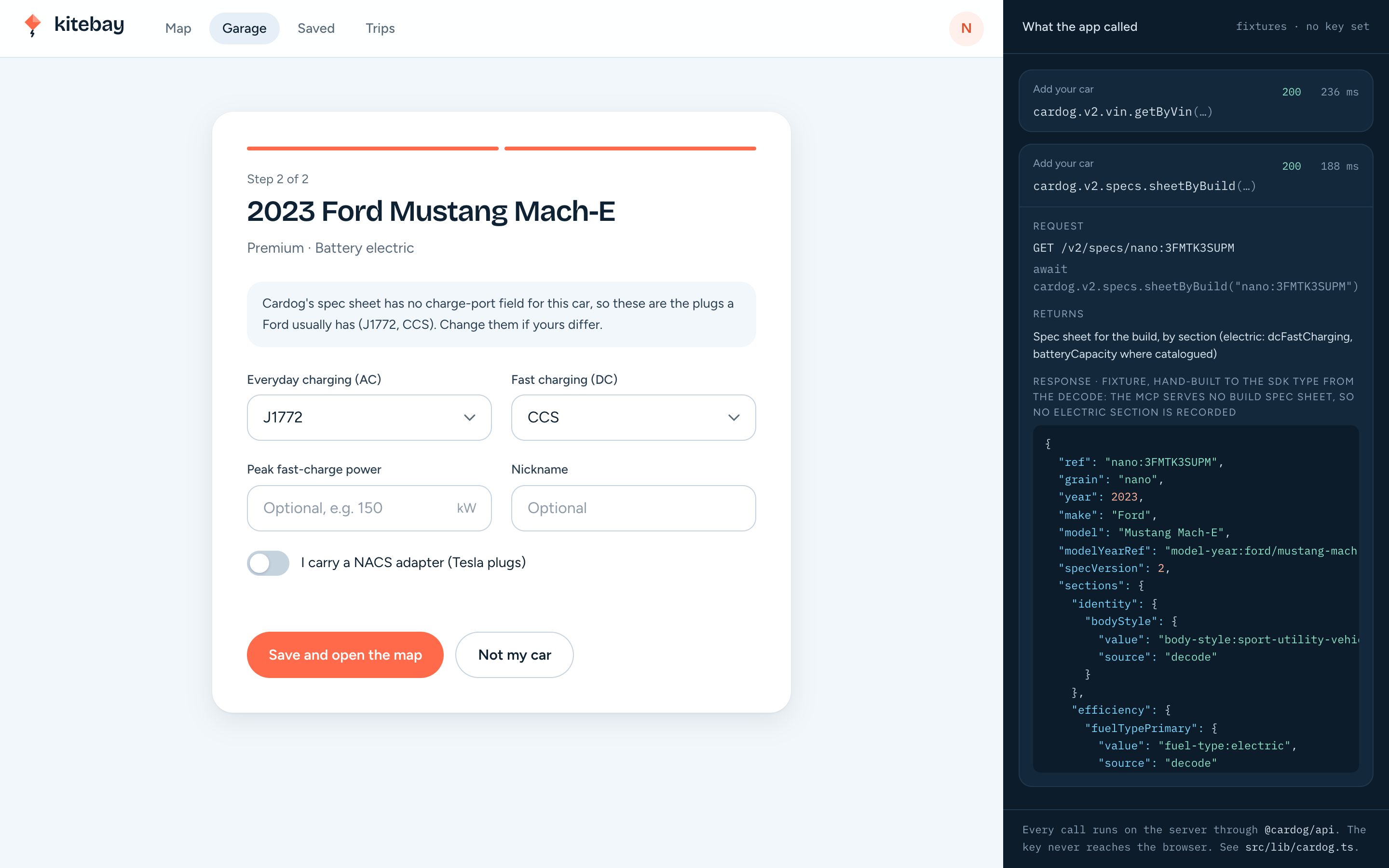
SDK call: cardog.v2.specs.sheetByBuild(nano)
What comes back. Spec values by section; the app reads electric.dcFastCharging and electric.batteryCapacity.
src/lib/cardog.ts
export function readBuildSpecs(nano: string, vin: string, step: string) {
  return run<BuildSpecSheet>({
    step,
    method: "cardog.v2.specs.sheetByBuild",
    args: [nano],
    http: `GET /v2/specs/${nano}`,
    returns: "Spec sheet for the build, by section (electric: dcFastCharging, batteryCapacity where catalogued)",
    fixture: () => vehicleFixture(vin, "specs"),
    live: (c) => c.v2.specs.sheetByBuild(nano),
  });
}
src/lib/car-read.ts
export async function readCar(userId: string, vin: string, step = "Add your car"): Promise<CarRead> {
  const decoded = await decodeVin(vin, step);
  if (!decoded.data) return { ok: false, error: decoded.error, facts: null, calls: [decoded.call] };
  const calls = [decoded.call];
  let specs = null;
  if (decoded.data.nano) {
    const s = await readBuildSpecs(decoded.data.nano, vin, step);
    calls.push(s.call);
    specs = s.data;
  }
  const facts = buildCarFacts(vin, decoded.data, specs);
  held.set(keyOf(userId, vin), { facts, calls, at: Date.now() });
  return { ok: true, error: null, facts, calls };
}
src/lib/vehicle.ts
export function buildCarFacts(vin: string, decode: VinIdentity | null, specs: BuildSpecSheet | null): CarFacts {
  const refs = (decode?.refs ?? {}) as Record<string, string | null | undefined>;
  const level = refs.electrificationLevel ?? "";
  const fuel = refs.fuelType ?? "";
  const isBev = level.includes("bev") || fuel === "fuel-type:electric";
  const isPhev = level.includes("phev");
  const plugsIn = isBev || isPhev ? true : level || fuel ? false : null;

  const electric = ((specs?.sections as Record<string, Section> | undefined)?.electric ?? {}) as Section;
  const fromSpec: string[] = [];
  let dcFast: boolean | null = null;
  const dc = electric.dcFastCharging?.value;
  if (dc != null) {
    fromSpec.push("dcFastCharging");
    dcFast = !(dc === false || dc === "unavailable" || dc === "no");
  }
  let batteryKwh: number | null = null;
  const bat = electric.batteryCapacity?.value;
  if (typeof bat === "number") {
    fromSpec.push("batteryCapacity");
    batteryKwh = bat;
  }

  return {
    vin,
    year: decode?.year ?? null,
    make: decode?.make ?? null,
    model: decode?.model ?? null,
    trim: decode?.trim ?? null,
    powertrain:
      isBev && !isPhev ? "Battery electric" : isPhev ? "Plug-in hybrid" : plugsIn === false ? "No plug" : null,
    plugsIn,
    isPhev,
    dcFast,
    batteryKwh,
    fromSpec,
  };
}
8. Confirm the plugs and save the car
Neither the decode nor the spec sheet names the car's charge port, so the screen offers the plugs a make usually has and the driver confirms them. A spec sheet that says no DC charging removes the DC port.
Saving reuses the reads the driver just saw, held for an hour, and makes the new car the one the map filters for.
src/lib/vehicle.ts
export function suggestedPlugs(f: CarFacts): { acPort: AcPlug; dcPort: DcPlug | null; from: "spec" | "make" } {
  const usual = usualPlugsFor(f.make, f.model);
  // A plug-in hybrid, or a spec that says no DC charging: no DC port.
  if (f.dcFast === false || (f.isPhev && f.dcFast !== true))
    return { acPort: usual.acPort, dcPort: null, from: f.dcFast === false ? "spec" : "make" };
  return { ...usual, from: "make" };
}
src/app/actions/garage.ts
export async function saveCar(rawVin: string, answers: PlugAnswers, portsFromSpec: boolean): Promise<{ id: string }> {
  const me = await requireViewer();
  const vin = normalizeVin(rawVin);
  const r = await heldOrRead(me.id, vin, "Save your car");
  if (!r.facts) throw new Error(r.error ?? "That VIN did not decode.");
  const a = clean(answers);
  const id = crypto.randomUUID();
  // The car just added is the one the driver is about to drive: it becomes active.
  db.update(schema.vehicle).set({ isActive: false }).where(eq(schema.vehicle.userId, me.id)).run();
  db.insert(schema.vehicle)
    .values({
      id,
      userId: me.id,
      vin,
      nickname: a.nickname,
      year: r.facts.year,
      make: r.facts.make,
      model: r.facts.model,
      trim: r.facts.trim,
      acPort: a.acPort,
      dcPort: a.dcPort,
      maxDcKw: a.maxDcKw,
      adapters: a.adapters,
      portsFrom: portsFromSpec ? "spec" : "driver",
      facts: r.facts,
      calls: r.calls,
      isActive: true,
    })
    .run();
  dropHeld(me.id, vin);
  revalidatePath("/garage");
  revalidatePath("/map");
  return { id };
}
9. Search stations for the map
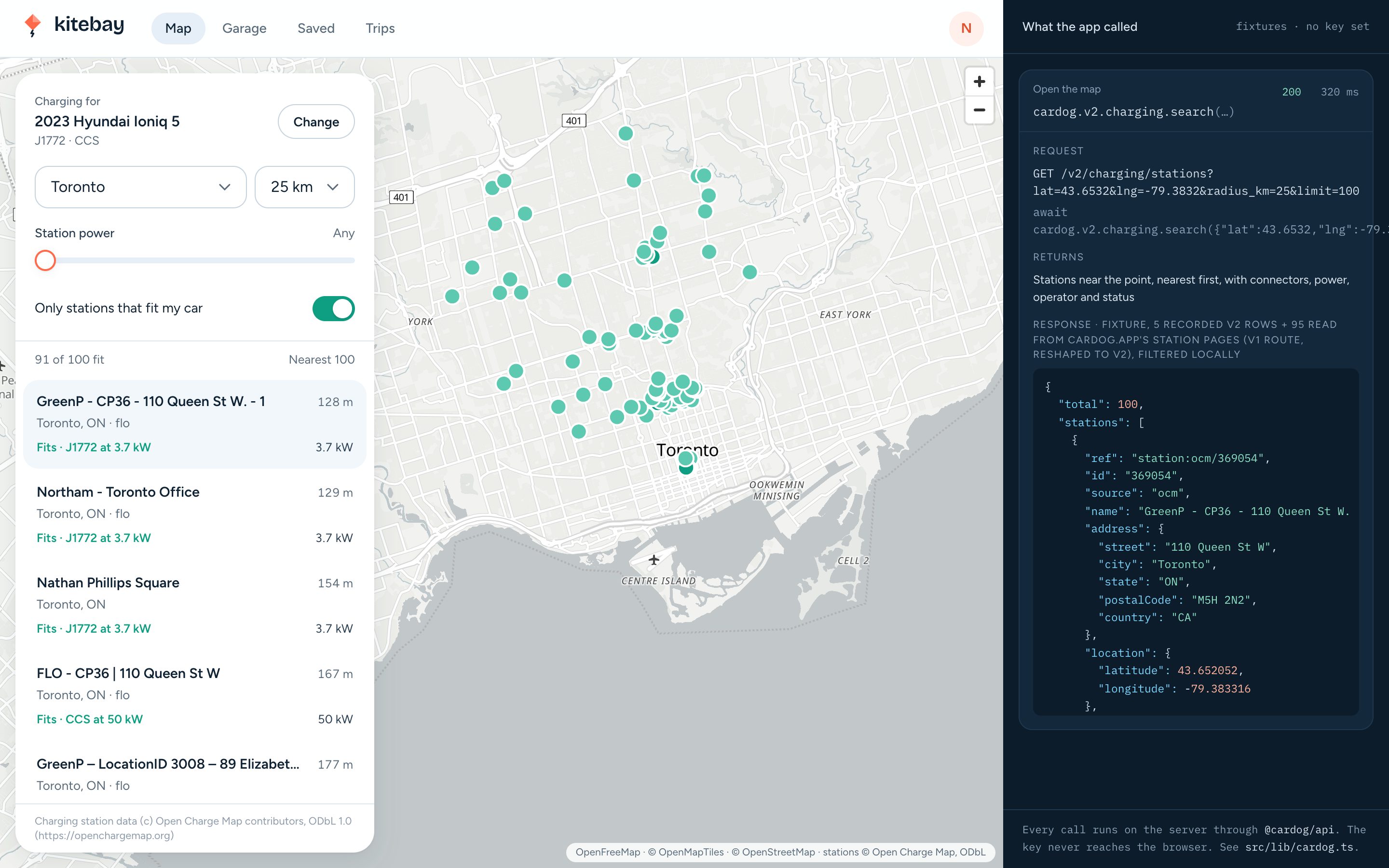
The map's first search runs on the server; later ones run from the panel through a server action. The power slider is min_power_kw and "Search this area" moves the centre. Show the response's ODbL attribution under the list.
SDK call: cardog.v2.charging.search({ lat, lng, radius_km, min_power_kw, limit })
What comes back. stations, nearest first, each with its connectors (type, AC or DC, kW, quantity), operator, status and last-verified date, plus attribution and asOf.
src/lib/cardog.ts
export function searchStations(params: StationSearchParams, step: string) {
  const qs = new URLSearchParams(
    Object.entries(params)
      .filter(([, v]) => v !== undefined)
      .map(([k, v]) => [k, String(v)])
  ).toString();
  return run<StationSearch>({
    step,
    method: "cardog.v2.charging.search",
    args: [params],
    http: `GET /v2/charging/stations?${qs}`,
    returns: "Stations near the point, nearest first, with connectors, power, operator and status",
    fixture: () => searchFixture(params),
    live: (c) => c.v2.charging.search(params),
  });
}
src/app/actions/stations.ts
export async function findStations(q: StationQuery, step = "Map search"): Promise<StationResults> {
  await requireViewer();
  const r = await searchStations(
    {
      lat: round(q.lat),
      lng: round(q.lng),
      radius_km: Math.min(500, Math.max(1, Math.round(q.radiusKm))),
      min_power_kw: q.minPowerKw > 0 ? q.minPowerKw : undefined,
      connector: q.connector,
      status: q.status,
      limit: 100,
    },
    step
  );
  return {
    ok: !!r.data,
    error: r.error,
    stations: r.data ? r.data.stations.map(toLite) : [],
    attribution: r.data?.attribution ?? null,
    asOf: r.data?.asOf ?? null,
    call: r.call,
  };
}
10. Light up the stations that fit
A station fits when it has a connector in the car's AC or DC family, adapters included, and sites listed for one maker's cars fit only that maker. Fit shows the best power the car can draw there: the connector's rating, capped at the car's peak when the driver set one.
src/lib/plugs.ts
export function fitFor(connectors: ConnectorLike[], car: CarPlugs | null, operator?: string | null): Fit {
  const families = uniqueFamilies(connectors);
  if (!car) return { fits: false, best: null, families };
  if (isTeslaOnly(operator) && (car.make ?? "").toLowerCase() !== "tesla") return { fits: false, best: null, families };
  const { ac, dc, viaAdapter } = accepts(car);
  let best: Fit["best"] = null;
  for (const c of connectors) {
    const fam = familyOf(c.connectionTypeId);
    if (!fam) continue;
    const ok = c.currentType === "DC" ? dc.has(fam) : ac.has(fam);
    if (!ok) continue;
    // The car takes no more than its own peak, when the driver told us it.
    const kw = c.currentType === "DC" && car.maxDcKw ? Math.min(c.powerKW || 0, car.maxDcKw) : c.powerKW || 0;
    const cand = { family: fam, kw, current: c.currentType, viaAdapter: viaAdapter.has(fam) };
    if (!best || rank(cand) > rank(best)) best = cand;
  }
  return { fits: best !== null, best, families };
}
11. Add favourites and trips
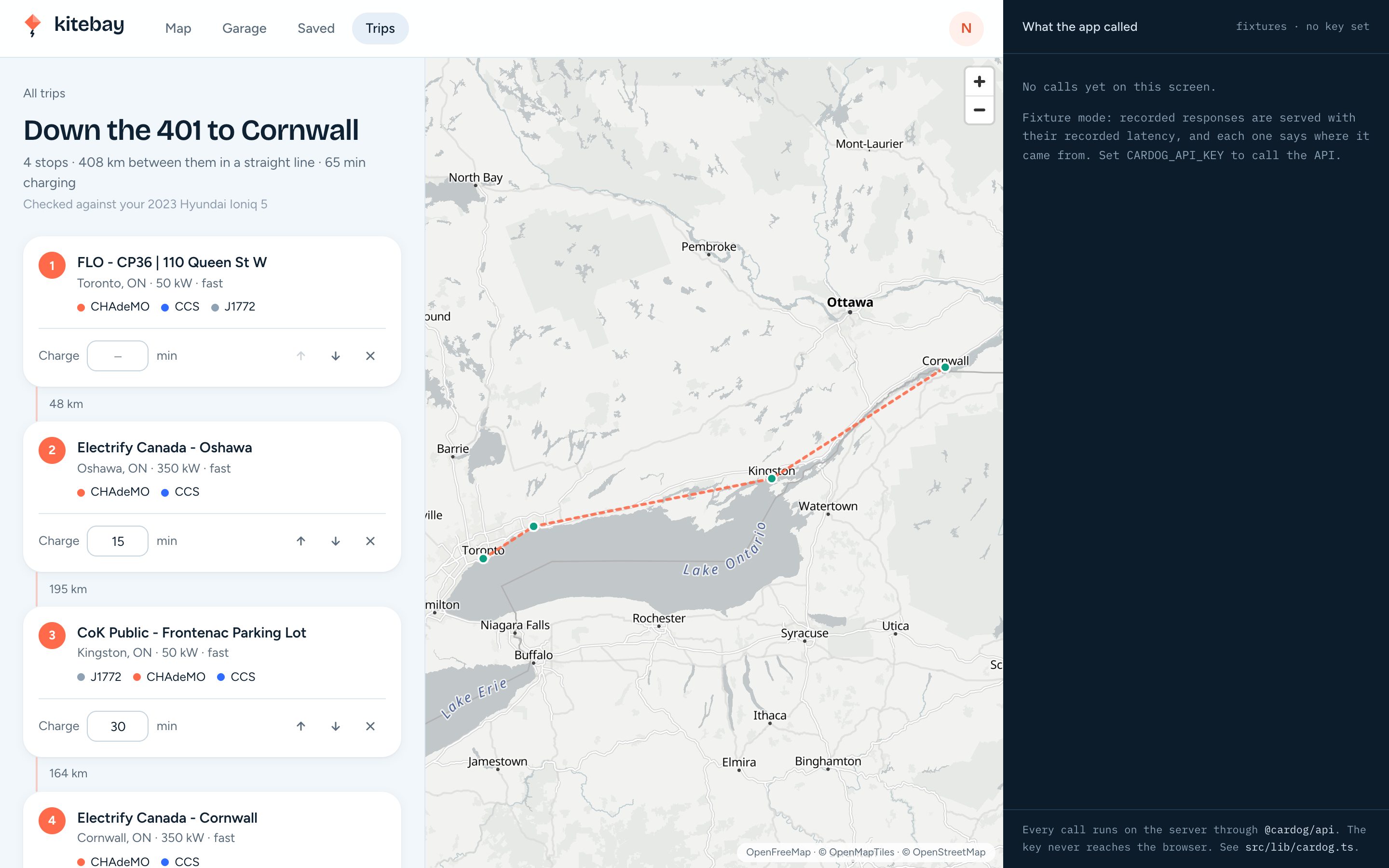
Each station has a page read fresh, so a favourite or a trip stop shows today's status. Favourites and trip stops keep only the station id and a small snapshot; stations themselves are always read from the API.
Trip legs are straight-line distances, and the trip says so.
SDK call: cardog.v2.charging.station(id)
What comes back. One station: address, connectors, power, operator, status and last verified.
src/lib/cardog.ts
export function readStation(id: string, step: string) {
  return run<StationDetail>({
    step,
    method: "cardog.v2.charging.station",
    args: [id],
    http: `GET /v2/charging/stations/${id}`,
    returns: "One station: address, connectors, power, operator, status, last verified",
    fixture: () => stationFixture(id),
    live: (c) => c.v2.charging.station(id),
  });
}
src/app/actions/saved.ts
export async function toggleFavourite(station: StationSnapshot): Promise<boolean> {
  const me = await requireViewer();
  const where = and(eq(schema.favourite.userId, me.id), eq(schema.favourite.stationId, station.id));
  const existing = db.select().from(schema.favourite).where(where).get();
  if (existing) db.delete(schema.favourite).where(where).run();
  else
    db.insert(schema.favourite)
      .values({ id: crypto.randomUUID(), userId: me.id, stationId: station.id, station })
      .run();
  revalidatePath("/saved");
  return !existing;
}
src/app/actions/saved.ts
export async function addStop(tripId: string, station: StationSnapshot): Promise<{ tripId: string; tripName: string }> {
  const me = await requireViewer();
  let id = tripId;
  if (tripId === "new") {
    id = (await createTrip(`Trip via ${station.city ?? "a stop"}`)).id;
  }
  const t = own(me.id, id);
  const last = db
    .select({ p: max(schema.tripStop.position) })
    .from(schema.tripStop)
    .where(eq(schema.tripStop.tripId, id))
    .get();
  db.insert(schema.tripStop)
    .values({ id: crypto.randomUUID(), tripId: id, position: (last?.p ?? -1) + 1, stationId: station.id, station })
    .run();
  touch(id);
  revalidatePath("/trips");
  revalidatePath(`/trips/${id}`);
  return { tripId: id, tripName: t.name };
}
12. Build the network admin
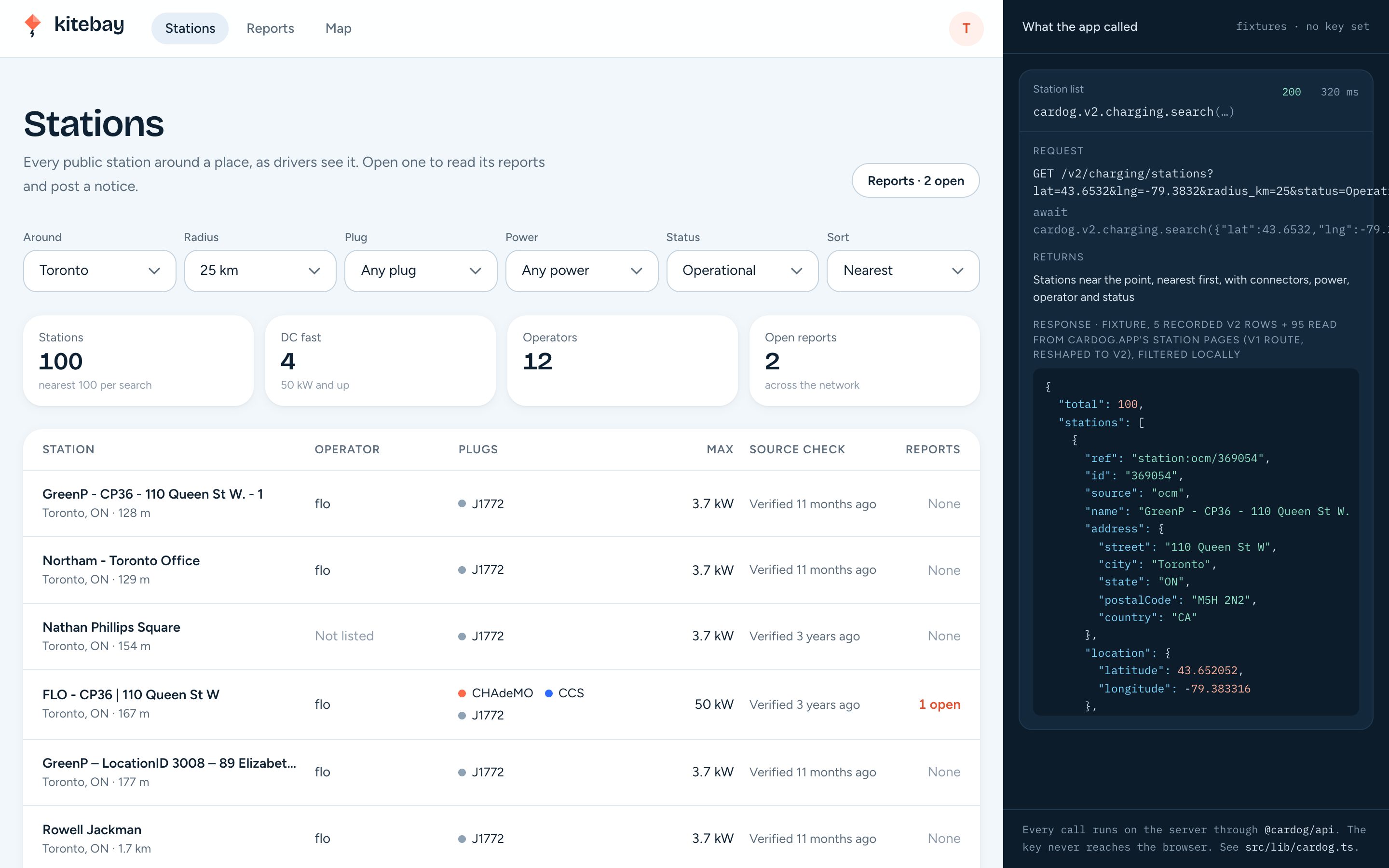
The admin lists the stations around a place, filtered by plug, power and status. The plug filter is the search's connector, one search per connector id in the family, merged. Drivers report problems from a station's page; the admin works the queue and can post a notice every driver sees.
src/app/actions/reports.ts
export async function fileReport(station: StationSnapshot, kind: ReportKind, note: string) {
  const me = await requireViewer();
  if (!(kind in REPORT_KINDS)) throw new Error("Pick what's wrong.");
  db.insert(schema.report)
    .values({
      id: crypto.randomUUID(),
      userId: me.id,
      stationId: station.id,
      station,
      kind,
      note: note.trim().slice(0, 500) || null,
    })
    .run();
  revalidatePath("/admin");
  revalidatePath("/admin/reports");
}
src/app/actions/reports.ts
export async function postNotice(station: StationSnapshot, message: string) {
  const me = await requireAdmin();
  const m = message.trim().slice(0, 240);
  if (!m) return;
  db.insert(schema.notice)
    .values({ id: crypto.randomUUID(), stationId: station.id, station, message: m, createdBy: me.name })
    .run();
  revalidatePath(`/admin/stations/${station.id}`);
  revalidatePath(`/stations/${station.id}`);
  revalidatePath("/admin");
}
13. Deploy
Kitebay ships as one container with SQLite on a volume. Build the image, mount the volume, and set the key, the auth secret and the public URL in the host's environment. On a serverless host, swap SQLite for a hosted database; the Cardog code does not change.
Dockerfile
# Kitebay charging map: one container, SQLite on a mounted volume.
#   docker build -t kitebay .
#   docker run -p 3025:3025 -v kitebay-data:/app/data \
#     -e CARDOG_API_KEY=... -e BETTER_AUTH_SECRET=... -e BETTER_AUTH_URL=https://your.host kitebay
FROM node:22-bookworm-slim AS build
WORKDIR /app
RUN corepack enable
COPY package.json pnpm-lock.yaml ./
RUN pnpm install --frozen-lockfile
COPY . .
RUN pnpm build

FROM node:22-bookworm-slim
WORKDIR /app
ENV NODE_ENV=production
RUN corepack enable
COPY --from=build /app ./
VOLUME /app/data
EXPOSE 3025
CMD ["pnpm", "start"]
terminal
docker build -t kitebay .
docker run -p 3025:3025 -v kitebay-data:/app/data \
  -e CARDOG_API_KEY=your_cardog_api_key \
  -e BETTER_AUTH_SECRET=$(openssl rand -base64 32) \
  -e BETTER_AUTH_URL=https://map.example.com \
  kitebay
Next steps
- Charging: Every field and filter of the station search.
- VIN decode: Every field the decode returns.
- Units: How power, capacity and distance are reported.
Was this helpful?